Navigating the AI Revolution: Your Comprehensive Guide to the Best Tools & Strategies

Artificial Intelligence is no longer a futuristic concept; it’s a practical, powerful tool reshaping industries.

This guide moves beyond surface-level comparisons to offer in-depth analysis, hands-on experiences, and practical case studies to help you master the AI landscape in chat,image, video, and content .
A dynamic collage of AI-generated art, chat interfaces, and video clips

The Ultimate Guide to AI Tools 2025: Art, Chat, Content & Video

AI image generation has democratized digital art. But true mastery lies in choosing the right tool and understanding the nuance of communication.

 It’s an art form in itself.

 Let’s look at the two dominant platforms from a practical standpoint.

Midjourney vs. Leonardo.Ai: A Hands-On Comparison

My Personal Experience:

After generating thousands of images on both platforms, the distinction is clear.

 Midjourney feels like collaborating with a master painter.

 Its default “aesthetic” is opinionated and stunningly beautiful. 

You guide it, but it brings its own powerful artistic vision.

 Leonardo.Ai, on the other hand, feels like an infinitely versatile workshop. 

It gives you direct control over every element, from training your own models on specific styles to using fine-grained tools like ControlNet for precise composition.

Midjourney vs. Leonardo.Ai

  • Midjourney operates with an “art director” philosophy, prioritizing aesthetic beauty and artistic coherence. It excels at quickly creating stunning, high-end visuals, even if it means deviating slightly from a literal prompt to achieve a more beautiful result.

  • Leonardo.Ai, on the other hand, functions as a powerful “toolkit” model. It gives the user extensive control and customization options. Its key features include a suite of advanced tools like ControlNet and Image Guidance, which allow for precise control over composition, character poses, and consistent styles.

  • The learning curve for Midjourney can be initially steep due to its Discord-based interface. Mastering its unique “language” of prompting takes practice and experimentation.

  • Leonardo.Ai offers a more accessible starting point with its clean web-based UI. However, its deeper features, such as custom model training and ControlNet, introduce a higher skill ceiling for users who want to take full advantage of its capabilities.

  • Midjourney is best suited for artists and designers who need to rapidly generate breathtaking, high-quality artistic images and value speed and beauty above all else.

  • Leonardo.Ai is the ideal choice for commercial artists, game designers, and anyone who requires consistent characters, specific styles, or precise compositional control in their work.

Case Study: A Freelance Designer Expands Her Services

Challenge: A freelance graphic designer wanted to offer custom illustrations for her clients (e.g., blog post headers, social media graphics) but lacked the time to create them from scratch.

Solution: She used Leonardo.Ai to train a custom model on her own artistic style, using 20 of her previous illustrations. 

Now, for new clients, she can generate dozens of on-brand concepts in minutes. 

Using the Image Guidance feature, she can ensure the composition perfectly fits the client’s layout requirements.

Result: She tripled her output for illustration-based projects and was able to take on more clients, significantly increasing her monthly revenue.The AI became her creative assistant, not her replacement.

MidJourney VS Leonardo AI — Same Prompt, Different Results

AI Chatbots: Your New Reasoning Engine

We’ve moved beyond simple Q&A. Today’s top models are multi-modal reasoning engines. The choice between ChatGPT-4o and Gemini often comes down to ecosystem and interaction style.

ChatGPT-4o vs. Google Gemini: The Practical Difference

  • Core Strengths:

    • ChatGPT-4o excels at fluid, real-time, multi-modal interaction. It is designed to feel like a creative and conversational partner, with best-in-class performance for voice conversations and live visual analysis. It also offers a rich ecosystem of custom GPTs.

    • Google Gemini‘s primary strength is its deep integration with the Google ecosystem. It functions as a powerful “logistics engine” that can access and leverage live, real-time data from services like Gmail, Google Maps, Google Flights, and your personal calendar.

  • Practical Use Cases:

    • ChatGPT-4o is ideal for interactive tasks such as live brainstorming sessions, pair programming by sharing your screen, creative writing, and generating ideas on the fly. Its speed and conversational ability make it great for quick, dynamic interactions.

    • Google Gemini is highly effective for tasks that require accessing and managing personal data and web information. This includes planning complex trips (pulling flight info from emails and plotting routes on Maps), summarizing unread emails, managing your schedule, and getting up-to-date answers based on live web searches.

  • Multimodality:

    • Both models are natively multi-modal, meaning they can process and generate content across text, audio, images, and video.

    • ChatGPT-4o‘s multimodality is particularly optimized for rapid, human-like conversations and live analysis, such as looking at something through your camera and providing immediate feedback.

    • Google Gemini‘s multimodality is leveraged to enhance its core strengths, for example, by analyzing uploaded files or images and integrating that information with its Google app connections.

Case Study: An E-commerce Store Reduces Support Tickets by 40%

Challenge: A small online store was overwhelmed with repetitive customer service emails about order status, return policies, and product specifications.

Solution: They used Google’s Dialogflow (powered by Gemini) to build a chatbot for their website. They fed it their entire FAQ page, shipping policy documents, and product catalog. They integrated it with their Shopify store’s API.

Result: The chatbot now handles over 70% of initial customer inquiries. It provides instant order tracking, explains return procedures, and can even recommend products based on customer questions. Support tickets dropped by 40% within two months, freeing up the human team to handle complex issues and improve customer satisfaction.

AI Content: The Scalable Writing Assistant

In-Depth Review of Jasper.ai: Is It Worth It?

Using Jasper is like having a team of junior writers at your command. 

The “Boss Mode” is powerful, but the real value is in the structured templates and the “Brand Voice” feature.

 I was able to upload a company’s style guide and existing blog posts, and Jasper learned to write in that specific tone. 

However, the best results come from a human-AI partnership: Jasper produces the first 80%, and a human editor refines, fact-checks, and adds the final 20% of strategic insight and personality.

Case Study: Marketing Agency Achieves 3x Content Output

Challenge: A B2B marketing agency needed to produce weekly blog posts, social media updates, and ad copy for a new tech client but didn’t have the budget to hire more writers.

Solution: They subscribed to Jasper.ai. They used the “Blog Post” workflow to generate outlines and initial drafts, the “AIDA Framework” template for ad copy, and the “Content Improver” to repurpose blog content for Twitter and LinkedIn.

Result: The agency was able to increase its content output for the client by 300% while maintaining quality. The time saved allowed their senior strategist to focus on high-level planning instead of drafting. The client was thrilled with the increased online presence, and the agency secured a long-term retainer.
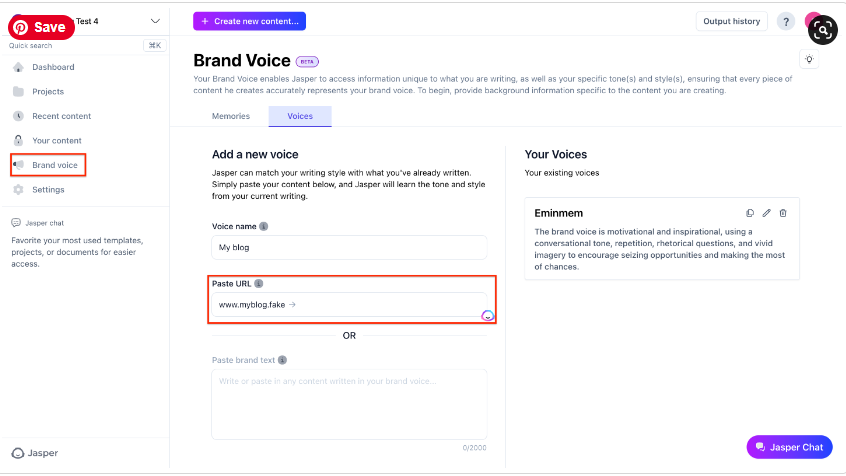
A screenshot of the Jasper.ai interface showing the Brand Voice feature

AI Video: The New Frontier of Marketing

Top AI Video Generators: Choosing Your Weapon

The key is to match the tool to the task.

Synthesia or HeyGen are unbeatable for corporate communication.Think training videos or sales outreach where a consistent, professional avatar is key.

For turning a blog post into an engaging social video, InVideo is a workhorse.

For purely creative and cinematic output, tools like RunwayML and Pika Labs are leading the charge, though they are still more experimental.

Case Study: A Real Estate Agent Creates Personalized Tours

Challenge: A real estate agent wanted to send personalized video walkthroughs to potential international buyers but didn’t have time to film a unique video for every inquiry.

Solution: Using Synthesia, she created a template with her own custom AI avatar. The script was 90% the same for each property, but she could easily change the intro to address the potential buyer by name and mention key features they were interested in (“Hi John, as you mentioned you wanted a large backyard, take a look at this…”).

Result: Her engagement rate with potential buyers skyrocketed. The personalized touch of the videos made clients feel valued and led to a 25% increase in qualified leads scheduling virtual meetings.

Luma AI vs. Runway Gen-3: Which AI Video Creation Tool is Right for You?

With the demand for video-based content rising – from social videos that need to pop and users looking for the fastest way to learn – AI-powered video creation has become less ‘cool thing to use’ and more ‘I need it in my life.

In this article, we’ll be looking at Luma vs Runaway.

Luma AI’s Dream Machine and Runway Gen 3 have become popular ai video creation tools, so let’s look at what they’re good at and which one might be better for you to use to start getting AI-powered video creation into your life.

Luma AI: The Simpler AI Video Creation Tool

Simply put, Luma AI’s Dream Machine is extremely easy to use.

It’s a platform designed to be easy to use and accessible to a wide audience.

It takes a simple text prompt and transforms it into a video.

Additionally, you can also give it still images to animate with your prompt. You can even give it more than one to identify frames you want within the generated video.

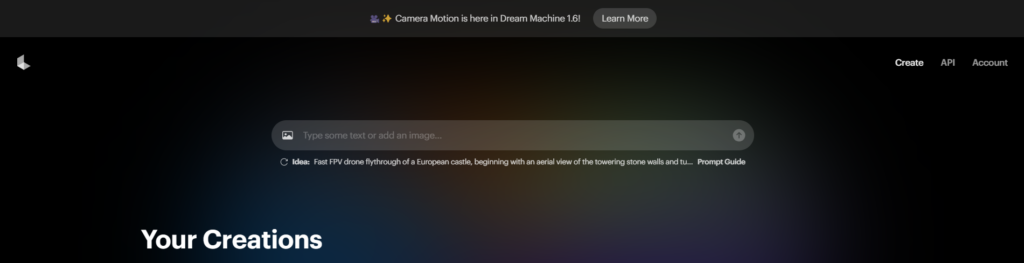
Luma AI dream labs user interface

Key Features of Luma AI

  • User-friendly Interface: Luma AI has a simple UI, making it instant for anyone to start using AI video creation.
  • Text-to-Video Generation: Use a text prompt to bring your idea to life.
  • Image-to-Video Transformation: Convert static images into moving videos with smooth animations and realistic movements (getting the movement as you want it might take trial and error sometimes).
  • Looping Feature: Easy to create looped videos for social media content.
  • Free Plan with Limitations: Luma AI has a free plan with 30 video generations per month, allowing users to explore it before committing to a paid subscription.

Runway Gen-3: Professional-Grade AI Video Creation Tool

Runway ML‘s Gen-3 is a more advanced AI video creation platform that better serves video editors, creative teams, and professional filmmakers.

Basically, anyone with experience using video editing software.

It has more tools available for videos of much higher visual quality (we’re talking real high-fidelity videos) and a lot more editing capabilities for you to create a polished product right on the platform.

Don’t let someone outpace you – check out these 15 useful AI tools after you learn how to use Luma AI

Key Features of Runway Gen-3

  • Advanced AI for High-Quality Video: Runway Gen-3 utilizes cutting-edge AI models to produce videos with exceptional realism and detail.
  • Extensive Editing Tools: Fine-tune your videos with advanced editing features like motion tracking, background removal, and seamless integration with industry-standard software like Adobe Creative Suite.
  • Collaboration Features: Runway Gen-3 facilitates seamless collaboration for teams working on larger video projects.
  • Flexible Pricing Plans: Runway Gen-3 offers a range of pricing plans tailored to different needs and usage levels.

Side-by-Side Comparison of Popular AI Video Creation Tools

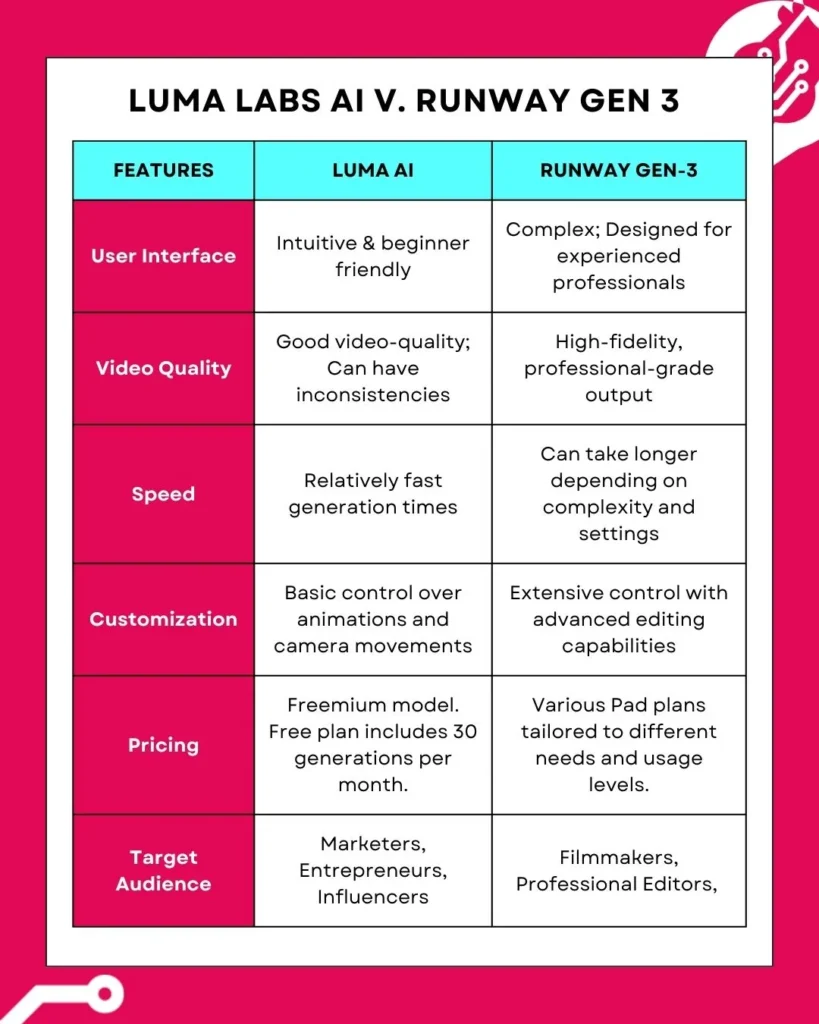
Here’s a quick look at these two ai video creation tools isde by side.

We’re comparing the following in this table: UI, quality of the video generated, the speed at which each tool generates videos, as well as how easy it is to customize the video you create with each.

Moreover, we included a quick comparison of pricing models and who each platform’s likely target audience is.

Side-by-side table of the two ai video creation tools Luma AI Dream Machine vs. Runway Gen-3

Weighing the Pros and Cons

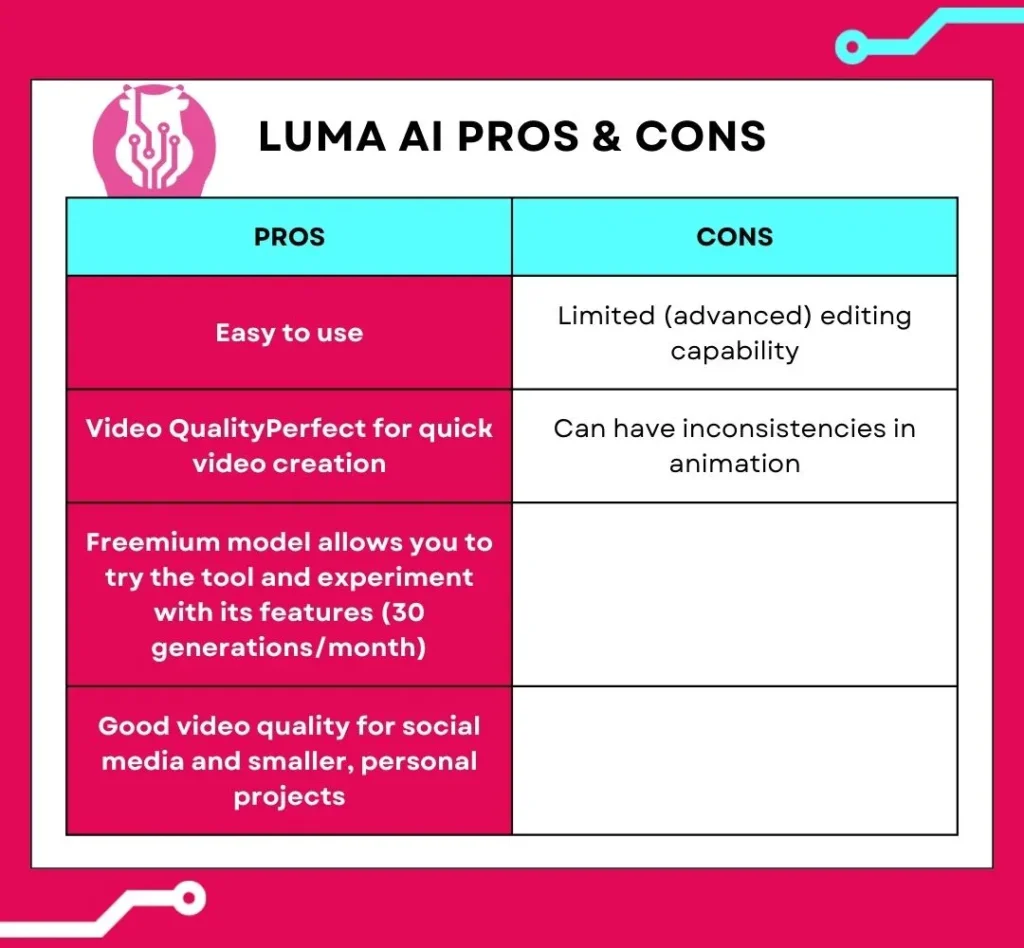
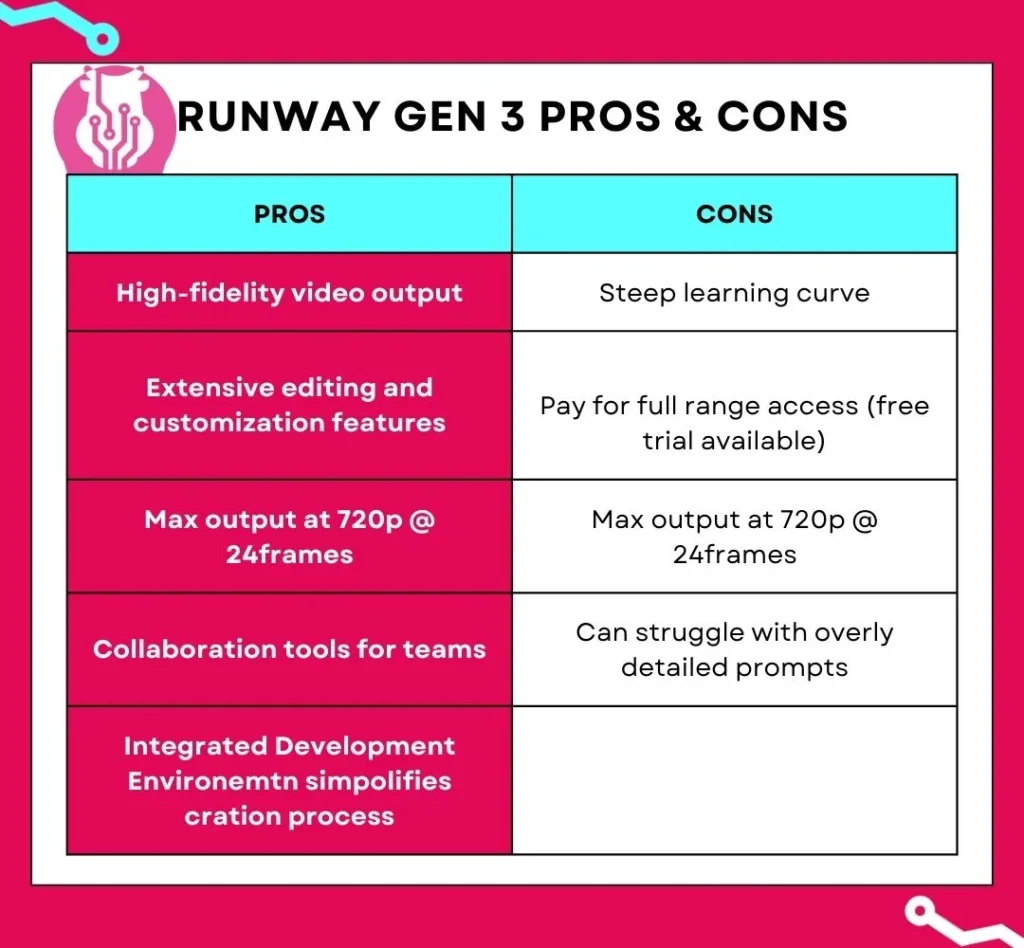
Let’s take a quick look at the pros and cons of each platform.

Use this to see which one better fits your creation needs.

Pros and Cons of Luma AI

Pros and cons table of ai video creation tool Luma AI Dream Machine

Pros and Cons of Runway Gen-3

Finding the Right Fit: Matching Tools to Use Cases

When to Use Luma AI:

  • Quick Social Media Videos: Luma AI’s Dream Machine is good when you’re creating quick, short-form videos for platforms like TikTok, Instagram, and Facebook.
  • Marketing Campaigns: Quickly generate eye-catching visuals for product demos, explainers, and promos.
  • Personal Projects: Bring your ideas to life without the need for editing skills.
  • Need An Extra Section: If you need an extra few seconds of video, using Luma can transform an image into something usable relatively quickly.

When to Use Runway Gen-3:

  • Professional Filmmaking: Leverage Runway Gen-3’s advanced capabilities for high-quality visual effects, scene generation, and post-production editing.
  • Complex Video Projects: Create sophisticated videos requiring intricate animations, motion tracking, and precise control over visual elements.
  • Team Collaboration: Streamline collaborative workflows for video production teams working on larger projects.

Use AI Video Creation Tools

So, you take your pick between Luma AI vs Runway.

Both are great tools for AI-powered video creation, but the choice depends on what you need.

For quick and simple video creation, Luma AI’s Dream Machine might be your better option.

For more professional-grade videos and way more editing control (and collaboration) Runway’s Gen-3 will be your better option.

If you’re still unsure what’s best, try both. They use a freemium model, so experiment and see what suits you best.

From Static to Stunning: How to Use Luma AI’s Image-to-Video Magic

It’s 2025, and video content is king. Thankfully, creating it is no longer as complex as it used to be. In just a few clicks, Luma AI’s video generator can breathe life into a still image. This how-to guide will show you the exact steps to take your visual storytelling to the next level.

Getting Started with Luma AI's Dream Machine

Luma AI is powered by the innovative Dream Machine. This allows creators of all levels to generate videos without any video editing knowledge. You get to generate 30 videos for free and can upgrade to a paid plan should you need more.

User interface of Luma AI Dream Machine

While you can create a video with its text-to-video capabilities, you’ll be able to better control the outcome by providing it with a high-quality image. Not a photographer? No problem! There are two primary ways to source an image:

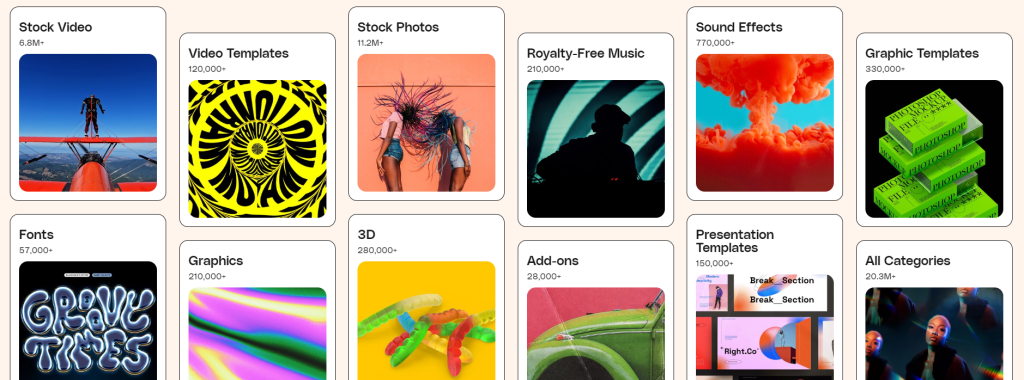
  1. Content Libraries: Stock photo websites like Envato, Freepik, and Shutterstock offer a vast collection of high-quality images.
  2. AI Image Generators: For a more customized approach, use AI image generators like Leonardo.ai or Midjourney to create unique images from detailed text descriptions.
Envato's image library interface

Animating Your Vision: A Step-by-Step Guide

Once you have your chosen image, it’s time to bring it to life with Luma AI. The process is remarkably simple:

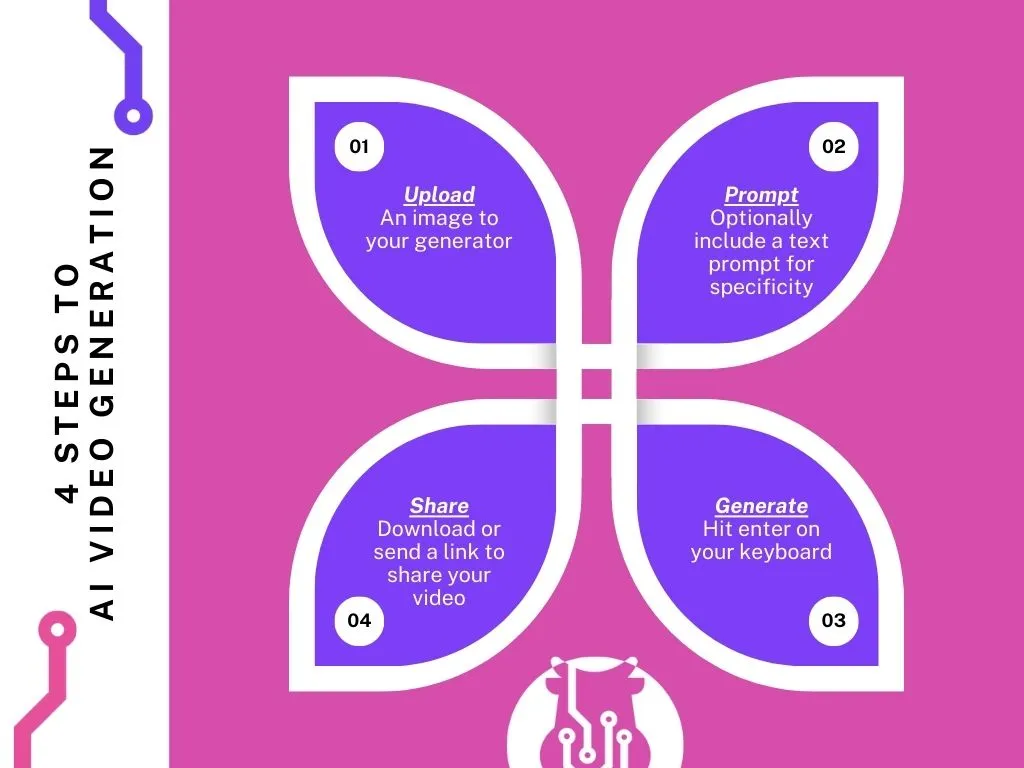
Step 1: Upload Your Image

Drag and drop your high-resolution image directly into the Luma AI interface. This will serve as the foundation for your video.

Step 2: Write Your Prompt

This is where the magic happens. Provide an optional text prompt to guide the animation. Describe how you want the image to come to life, including camera movements like panning, tilting, or zooming to add depth.

Step 3: Generate & Share

Once you’ve crafted the perfect prompt, hit “Enter” and let the Dream Machine work. The generation process usually takes a few minutes. When it's ready, you can download your video or share it directly.

Infographic showing the steps for AI video generation

Fun Fact: 89% of consumers want to see more videos from brands

0%

Are you meeting their expectations?

Tips on How to Use Luma AI Effectively

  • Resolution is Key: Always start with a high-resolution image to ensure the best possible video quality. The sharper your source image, the more detailed your final video will be.
  • Experiment with Prompts: Don’t be afraid to try different text prompts and camera movements. Each variation produces a unique result, allowing you to explore creative possibilities. Remember the free plan has a limit of 30 generations per month.
  • The Loop Advantage: Use Luma AI's Loop feature to create short, seamless videos perfect for social media. This enhances visual appeal and significantly reduces production time.
  • Addressing Glitches: As with any new tech, there might be minor irregularities. Luma AI is constantly evolving, and these are becoming less frequent. Don’t let a minor imperfection discourage you from exploring its vast creative potential.

Luma AI: Shaping the Future of Video Creation

Luma AI offers a fantastic solution for low-effort, high-quality video creation. Whether you’re a social media enthusiast, a seasoned video editor, or just a tech-geek who likes trying new tools, Luma AI can help you unlock creative potential you might not have known you had.

If you’re looking for more personalized help with your marketing efforts, book a complimentary 30-min session with us and let’s see how we can help.

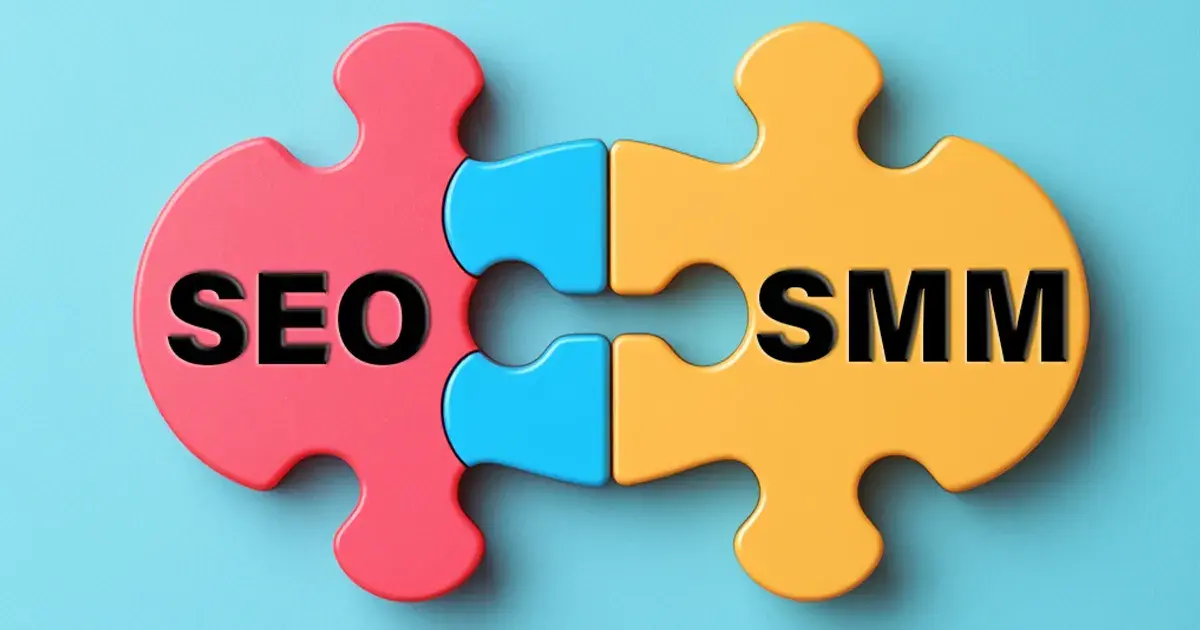
Integrating Social Media Marketing and SEO: Strategies for Starting Personal Brands and Businesses

Creating Effective Social Media Marketing: Tips and Best Practices for Personal Brands and Businesses

Launching Successful Social Media Ad Campaigns: A Step-by-Step Guide

So you searched up something about social media ad campaigns ( 👀) because you want to put your business in front of the billions of eyes scrolling through their social feeds – you know it’s a great opportunity for your business to boom, but you’re not sure what to do.

You tried that cool boost post feature, but it didn’t really do anything. A few new followers and likes are cool. But you heard it would lead to new customers – so where are they?

There’s more to social advertising than a boosted post – so let’s dive into how to launch a successful social media ad campaign and take a look at how you can get new customers with all that new engagement on your socials

Setting Clear Objectives – Everyone’s Step 1

Yes, you did read me writing about new customers, but that’s your ultimate goal. Your business goal. Your daily ‘I need to build my revenue and that means paying customers’ goal. Not your ad campaign goal.

Different goals have different measures and metrics of success.

So let’s quickly go through some objectives you might consider for your next successful social media ad campaign:

Defining Campaign Goals

Brand Awareness: If this is your goal, you’re trying to reach a broad audience – as big as possible. WE WANT EVERYONE TO HEAR ABOUT YOU EVERYWHERE. Metrics like impressions, reach, and engagement actually matter here and aren’t just vanity.

Lead Generation: Also not specifically new sales. Here, we’re looking to capture user information and that’s what you’ll want your creatives focused on. This typically happens after your users are aware of your brand and are now willing to interact. The metrics you’ll want to watch here are lead volume, cost per lead, and conversion rates.

Conversions: Yes, this is what you’ve been reading to – the sales campaigns, the let me get new customers campaigns. Here, ads must be highly persuasive and highly targeted. No need to waste money on targeting massive audience that most likely won’t convert. Aim at those who have focused with you and consistently find themselves going down your funnel (we will talk about this in another blog). Metrics like conversation rate, cost per conversion, and return on ad spend (ROAS) are what you’ll want to use to measure campaign performance and success.

Understanding Your Target Audience - The Step Everyone Just Knows

No, I don’t mean everyone knows this step, I mean where everyone goes like ‘I know the audience just trust me bro.’

No offense (maybe a little), but I’d rather not have to just trust but rather see and analyze the data we have such easy access to – Google, Facebook, and every social platform have paid millions to set it up for us – let’s use it.

Here are some data points you get access to:

  • Demographics: Find your audience’s age, gender, location, activity times, memes they find funny (not this one) and other relevant general data that allows you to build personas for you to target with specific ad content and targeting options.
  • Behavioral Data: Understand how your customers interact with you and others and target them accordingly with handcrafted funnels built for them. Maybe you want to make sure you get users who came to your website but didn’t make a purchase or users who liked a bunch of your jewelry collection’s images but haven’t gone to your website. Build retargeting campaigns, nurture them, and make your sale.
  • Customer Personas: Build out semi-fictional characters of your audience. These personas help you build better campaigns and create better content that focuses on their actual problems and challenges and how to best show them your product or service is the best for it.

Choosing the Right Platforms - Yeah I know you want to be on all of them but that doesn’t mean advertising on all of them

Budgets mean constraints, and that means we can’t spend our money wherever and whenever. Launching your social media ad campaigns on the right platform can really help you get another step closer to success.

Let’s take a look at some of the major ones. (come back and check this when you’re deciding on a platform for your next social media campaign 😁):

multi ethnic people holding social media and famous digital icons like share and hashtags and @ up showcasing the power of social media

Overview of Major Social Media Platforms

  • Facebook: More than 2.7 billion active users make Facebook a versatile platform for a wide range of advertising options with a massive range of demographics and interests. It’s great for businesses looking to target specific demographics and interests.

  • Instagram: Owned by META (and where they test all those gorgeous ideas that are mainly not theirs), this visually-driven platform is incredible at showcasing products and services for businesses that have strong visual branding and understand the importance of quality images and recordings.

  • TikTok: A massively growing platform that took the world by storm, especially younger audiences. This platform is excellent for businesses building their customer base with engaging short-form content and trying to go viral. As a new platform, it has the most potential for you to capitalize on new monetization avenues as compared to other long-established platforms.

  • X (I still prefer to call it Twitter): A great place for active businesses looking to stay top-of-mind. Campaigns here are pricier, but it gives some more targeting options like targeting according to specific posts on top of general demographics.

  • LinkedIn: The job board that was – Now, it’s a massive platform for B2B marketing and lets you target professionals directly making it perfect for businesses looking to connect with corporate audiences.

Selecting Platforms That Align with Your Goals

  1. Audience Alignment: Make sure your audience is active on the platform you’re choosing to advertise on. For example, if you’re looking to target young adults, you’re going to have a better time on Instagram and Tiktok as opposed to the older and more corporate LinkedIn.
  2. Content Type: Create visuals and creatives that align with the type of content on the platform you’re on. If you’re planning on using a lot of text, Twitter and LinkedIn are better options. If you’re planning on creating killer images and videos, Instagram and TikTok are where you want to be.

Creating Compelling Social Media Ad Campaign Content

Your social media ad campaign is more than just the audience your target and the image you push (although they play some big roles).

Here are some tips to build scroll-stopping ads and launch successful social media ad campaigns:

Tips for Crafting Strong Social Media Ad Campaign Copy:

  1. Clear Messaging: Make it clear, easy to follow, and directly communicate your value proposition. Remember talk to the human, not the algorithm!
  2. Call-to-Action (CTA): Tell your audience what to do next. They’re not always looking to buy, they’re scrolling, so have them do something else (like follow for more, or check your profile).
  3. Emotional Appeal: Build a connection with your audience with relatable elements to drive engagement. Tell a story in as few words as possible.
Content creator, wearing a hat, looking at his camera

Importance of Visuals​


  1. High-Quality Images and Videos: Use high-quality visuals and optimize for mobile since that’s usually how people access social media.
  2. Consistent Branding: Be consistent wherever your audience sees you. Brand colors, fonts, logos, NAP consistency. Don’t confuse anyone who knows you on Facebook if they find you on Instagram.
  3. Captions and Text Overlays: Add captions and text overlays. (But Rami, it’s video, why am I making the viewer read AND cover what I’m trying to show them?) More often people are watching videos with the sound off. Scrolling through reels/tiktok/shorts in transit and earphones aren’t available – no problem, phone’s muted and the text is there. No reason to scroll past. 

Optimizing Social Media Ad Campaigns with Keywords

Using Relevant Keywords in Ad Copy

  1. Keyword Research: Use tools like Google Keyword Planner, Ahrefs, or SEMrush to find relevant terms your audience uses to find your product/service.
  2. Natural Integration: Make sure you’re using the keywords naturally in your text and content. You don’t want your ads to look spammy – both the people and the algorithm don’t like it.
  3. Localized Keywords: Don’t forget your local audience and direct nearby traffic around you to you by using keywords like “SMM agency near me” or “best coffee shop in…”
TRENDING word written on white background. TRENDING text on white for your designs, concept.

Analyzing Search Trends and Popular Areas

  1. Google Trends: This tool will help you identify current trending topics related to your search terms and help you see if people are searching for it on the regular.
  2. Competitor Analysis: Grab insights from colleagues in the industry and see what they’ve performed with to find what works and what doesn’t.

Launching and Monitoring the Campaign - The Step Everyone Does Later (do it now)

Tips for Monitoring Performance and Adjusting the Campaign

  1. Platform-Specific Ad Managers: Use the ad managers provided by each platform (e.g., Facebook Ads Manager, LinkedIn Ads Manager) to set up and launch your campaigns. These tools offer detailed targeting options, budget controls, and performance metrics.
  2. Budget Allocation: Start small and scale up as you gather data and optimize your campaigns. Don’t waste money on something you don’t see working out and invest in what does.
  3. Ad Scheduling: Use the built-in features of platforms to determine the best time for your ads, and that’s when your users are actively scrolling through the platform.
  4. Track Key Metrics: Monitor key metrics depending on your objective (mentioned above) and see adjust depending on your campaign’s performance to make data-driven decisions.
  5. A/B Testing: run A/B tests to compare creatives, ad copy, CTAs, and identify what works best to optimize your campaigns granularly according to your audience.
  6. Regular Reporting: Do it now and always. Don’t overlook the crucial element you need to adjust strategy, allocate budget, and optimize ad performance.

Key Takeaways

  • Define Clear Objectives: Align your ad campaigns with your business goals.
  • Choose the Right Platforms: Select platforms where your target audience is most active.
  • Create Compelling Ad Content: Use clear messaging, strong CTAs, and high-quality visuals.
  • Optimize with Keywords: Integrate relevant keywords naturally into your ad copy.
  • Monitor and Adjust: Track key metrics and make data-driven decisions to optimize your campaigns.
Book a free consultation today and see how Fatcow Digital can help you launch and succeed with your social media ad campaigns.

How to Use Near Me Keywords in Social Media Marketing: A Guide for Local Businesses

Larger corporations have found their ways to limit competition in social advertising: outbid anyone smaller than me. So how can local, usually smaller, businesses compete with these international conglomerates? There are a few ways, but today we will dive into using near me keywords.

With social media’s domination of the advertising landscape, what was once a competitive market has now evolved into a hyper-competitive landscape with businesses, local and international, competing for social feed space. The marketplace has become crowded with everyone and everything taking up the same billboards, the same signs, and the same storefront – your phone’s screen.

So if you’re a local business looking to find a new way to attract customers than a simple ‘boost post’ button, the “near me” keyword can help you drive business at the best cost: free. Let’s take a look at how you can start today.

What Are Near Me Keywords

Importance of Near Me Keywords

  • Connecting with Local Customers

The near me keyword is a great way to have customers with high-purchase intent find you. Someone’s looking for a business like yours that’s close to them – this means they’re actively searching for what you offer. Whether they’re trying to find a ‘coffee shop near me’ or a ‘plumber near me’ this search term shows a strong intent to make a purchase quickly and high readiness to engage with a business.

  • Boosting Visibility in Local Searches

The near me keyword allows you to compete at the lovely cost of 0. Near Me boosts your visibility in local search results. This is major because users, more often than not, do not scroll past the first few search results. Getting yourself to appear as close to the top of the first page is immensely important. Get your business noticed by customers actively looking for what you offer.

  • Improving Mobile Search Results

Most near me keyword searches are done on phones and mobile devices. People using the near me keyword are usually already out and about and are looking for you now. Don’t sleep on optimizing for mobile and you’ll have more people walking through your door.

  • Increasing Trust and Credibility

Consistently showing up for the near me keyword builds trust with your market. Potential clients will react more favorably to a business that’s easy to find online, next to positive reviews and is only a few minutes away. By showing up near them constantly, you show your business is established, trusted, and reliable.

  • Staying Competitive in the Market

Businesses are starting to realize the importance of appearing in search results, so don’t lag and find yourself losing customers because they found your neighbor on Google, who’s not as near as you but is the only one that showed up because of their stronger digital search presence.

Implementing Near Me Keywords in Social Media Marketing

A 2D visual of a piece of paper with the text "keyword research" hung on a clothes line to represent the near me keyword research discussed in the section

Conducting Near Me Keyword Research

To benefit the most from the work you put into improving your digital footprint, you’ll want to research the best terms related to your business before linking them to the near me keyword.

Identify search phrases related to your overall business, your products, your services, and what locations you want to target.

Locations could mean your street, your neighborhood, your city, your county, etc. There’s no reason to limit yourself to only a street if you’re looking to get found by as many people as possible, but make sure to start with your street as that is as near as possible.

Optimizing Social Media Profiles for Local SEO

  • Complete and Accurate Profiles

Be consistent across your social media profiles and optimize for local SEO. Complete all fields, provide accurate information, and ensure NAP consistency (Name, Address, Phone number). Yes, really.

So many businesses make the mistake of having a website and social profiles with different names that people get confused, and they end up losing business that could have been theirs. Don’t make the same mistake.

  • Geotagging Posts

Geotagging can help your posts show up in search results. This is incredible for platforms that let users search for content using location, like Facebook and Instagram. Show where you are and let people find you.

  • Using Location-Specific Terms

Make sure to include geographic locations in your posts and your hashtags (and on your website). This will help search engines better understand what areas you serve and rank your business accordingly (at the top 😉).

If you are a business that services a specific geographical area like a mobile mechanic or you deliver to certain areas then make it known, there is a dedicated slot in your Google Business Profile (Google My Business Previously) just for that.

Integrating Near Me Keywords into Content

  • Natural Integration

Near me keywords help you avoid keyword saturation (overusing a keyword) simply by mixing them up with the near me keyword. Additionally, it also gives a better way to include keywords you want to target naturally, like “what are the best coffee shops near me” or “…locals looking for the best coffee near them.” (the bold text is the keyword a coffee shop would target).

  • Content Strategy

Factor in near me keywords within your content strategy so you can best make an impact with your post. It could be a blog post you’re sharing, a quick social story update, a customer review that mentions where you’re located, or even a reply that can be used to mention your store location.

Don’t lower your content quality – make it better with a new strategy.

  • Visual Content

Include location information in more than the caption. Add it to image alt-texts (if relevant), the file name, and even the description to help search engines understand the most important piece of context here: your location.

a picture of letters arranged to say the word keyword, with the the 'O' being a magnifying glass to represent finding the right near me keywords

Challenges and Best Practices

Avoiding Keyword Saturation

As mentioned before, don’t overuse the near me keyword. Keep content appealing without making it spammy. Adjust your strategy to include it while avoiding overusing it.

Local Competition

The near me keyword is a new digital battleground for businesses. Stand out by refining your strategy, offering a unique value proposition or selling point to your audience, and differentiating yourself from competitors.

Understand how your competitors are leveraging the keyword to best tackle it yourself and out-place them in people’s search results (or book a free strategy session and we’ll take a look together 👀).

Keyword Variability

Don’t stick to one or a few versions. People all communicate differently – this means they search differently. Think of variations to your targeted keywords and plan to hit a wide range of them to best target local users and increase your visibility.

Conclusion

Target near me keywords and get your business visible in the local market attracting more customers and driving business success.

Key Takeaways

  • Conduct Comprehensive Keyword Research: Identify the most relevant “near me” keywords for your business.
  • Optimize Social Media Profiles: Ensure all profiles are complete and NAP consistent.
  • Geotag Posts: Use location-specific terms to appear in local search results.
  • Natural Integration: Avoid keyword saturation by integrating keywords naturally into your content.

Porcer Ghana

Porcer Ghana Digital Marketing

PORCER GHANA

Porcer Ghana, a burgeoning brand, sought to expand its digital footprint. Fatcow Digital crafted a social media strategy that was more than just posts—it was a narrative, telling the brand’s story in a way that resonated with its audience. With a modest ad spend of $300, we targeted high-engagement groups, resulting in a follower count that soared from 500 to 10,000 within two months. This wasn’t just about numbers; it was about building a community that engaged and believed in Porcer Ghana’s products.

Results Attained: Grew from 500 to 10,000 followers in two months with a $300 ad spend


For a comprehensive view of our work, click here to explore our entire portfolio.

Clients:
PORCER GHANA
Project Type:

Content Creation, Media Buying, Social Media Advertising

Date:
2019-06-12
Address:

GHANA

Link:
WWW.PORCERGHANA.COM
A pink element of or motif representing Fatcow Digital Branding

Warwick Stone 55

Warwick Stone 55 - Photography & Socials

Warwick Stone 55: A Digital Transformation

Situated in Zalka, Warwick Stone 55 stands as a testament to the international acclaim of Warwick Hotels. Our collaboration with this esteemed hotel chain was an immersive journey to capture its essence. Through multiple meticulously planned photo and video sessions, we encapsulated the grandeur and elegance of every corner of the hotel.

But our endeavour didn’t stop at visuals. Recognizing the potential of Stone 55, we meticulously crafted an upscale brand image that resonates with its stature. Their social media platforms were transformed from mere pages to digital showrooms, exuding luxury and sophistication at every scroll.

Achievements Unveiled:

  • Consistent daily growth in organic followers, reflecting an engaged and appreciative audience.


For a comprehensive view of our work, take a look at our entire portfolio.

Clients:
WARWICK STONE 55
Project Type:

Photography, Social Media Management

Date:
2023-03-01
Address:
MATEN – LEBANON
Link:
HTTPS://WWW.WARWICKHOTELS.COM/WARWICK-STONE-55
A pink element of or motif representing Fatcow Digital Branding

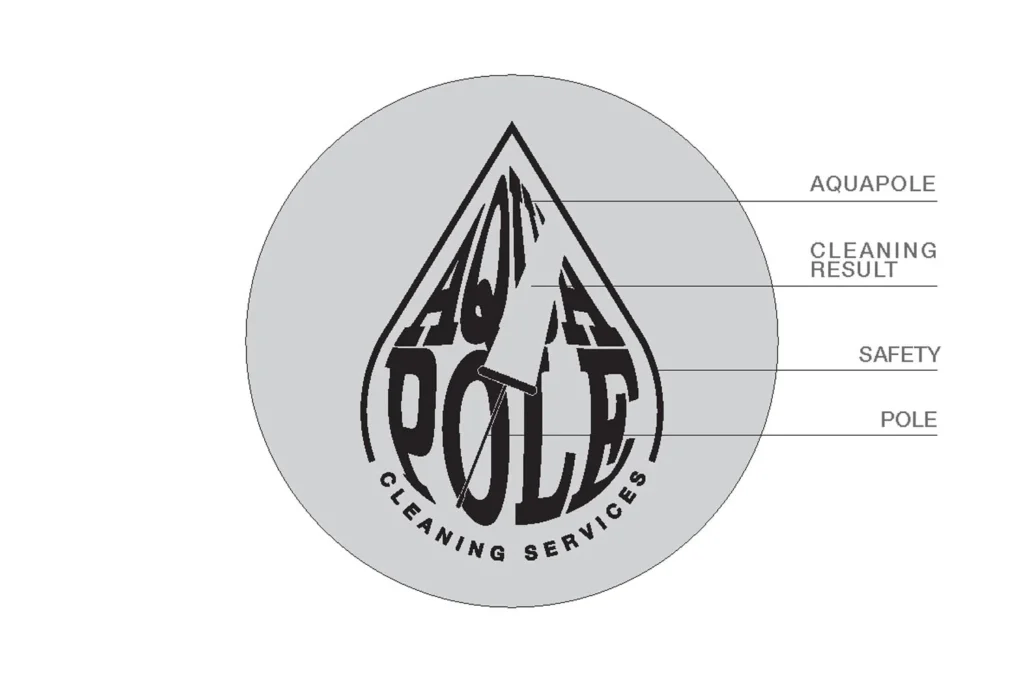
Aquapole

Aquapole Web Design & Branding

Branding Excellence for Aquapole

Translating Vision into Aesthetic Reality

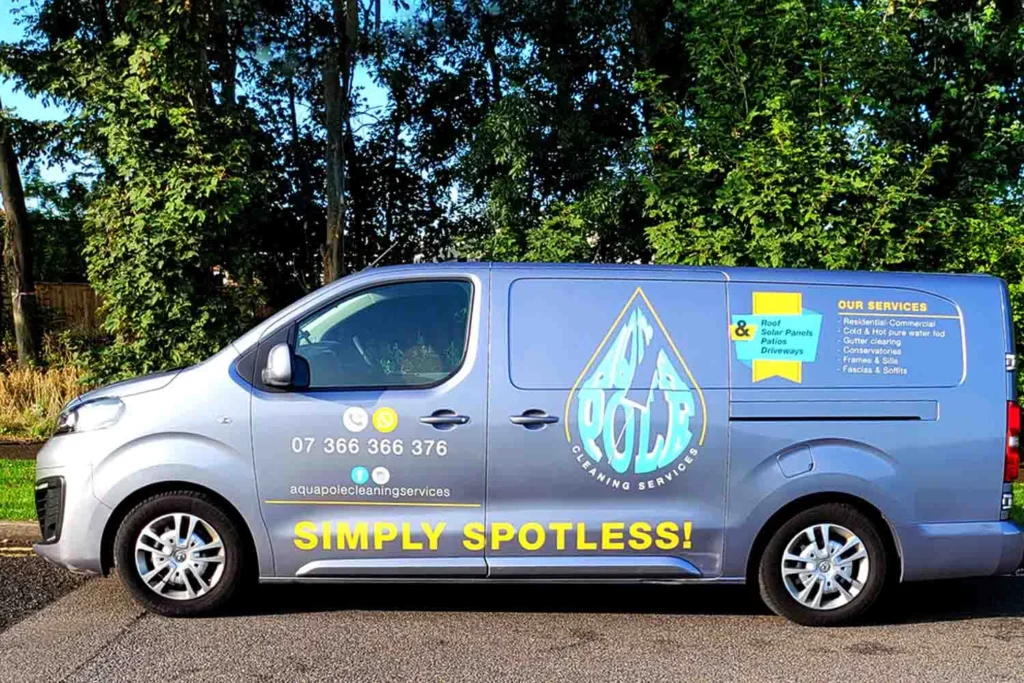
Aquapole, nestled in the heart of Sussex, a historic county of southeastern England, envisaged a brand identity mirroring its high-quality window cleaning services. The owner’s specific color and design ideas were meticulously brought to life by Fatcow Digital, exceeding his expectations and earning gleeful approval.

Clients:
AQUAPOLE
Project Type:

Branding, Content Creation, Web Development, Social Media Management

Date:
2023-08-01
Address:
SUSSEX – UK
Link:
WWW.AQUAPOLE.NET
A pink element of or motif representing Fatcow Digital Branding

Website Creation: Balancing Simplicity with Professionalism

Simplicity and Professionalism Entwined

The aspiration for a simplistic yet professional website was promptly realized for Aquapole. The collaborative synergy between us and the owner, who valued swift communication and promptly provided essential assets like images and videos, propelled the project to completion 10 days ahead of the deadline. This accelerated timeline showcased the owner’s commitment and our ability to deliver a well-designed website that reflects Aquapole’s brand ethos efficiently.

Initiating Digital Engagement

Organic Beginnings with a Vision for Paid Amplification

Our digital voyage with Aquapole commenced with organic social media postings, establishing a solid online presence. As we inch towards launching paid campaigns, the digital footprint of Aquapole continues to expand, promising a flourishing online engagement.

Results Attained:
A captivating brand identity, a user-friendly website, and an evolving digital marketing strategy, laying a robust foundation for Aquapole’s online growth.


Click here to explore our entire portfolio