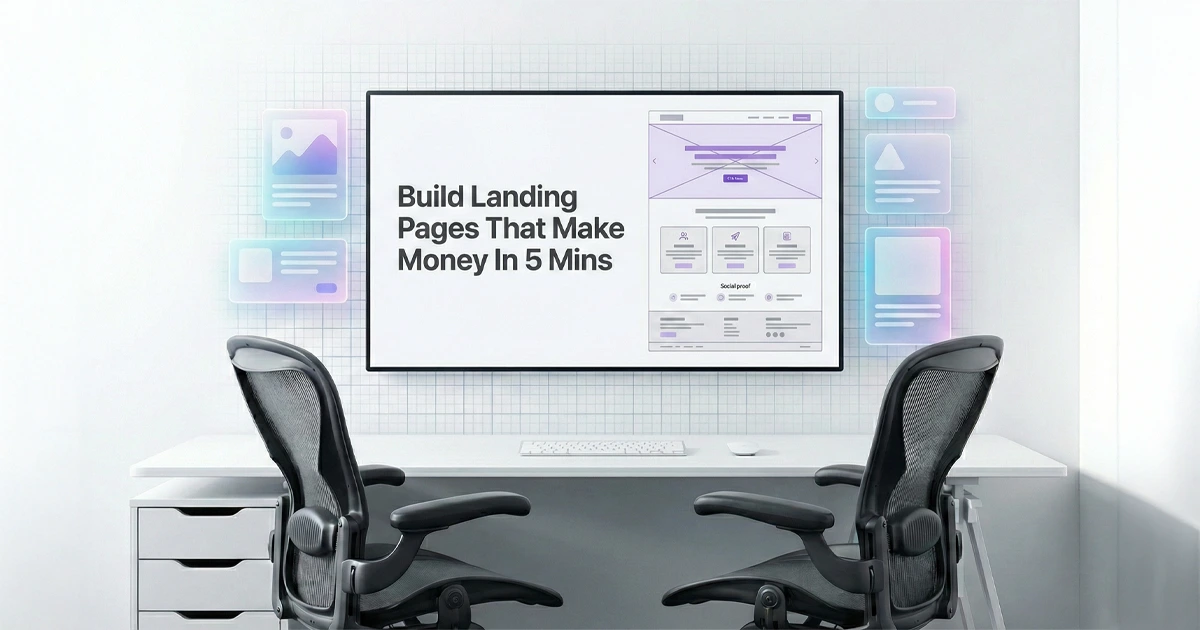
10 Prompts That Turn Any Landing Page Into a Sales Machine

Why Do Landing Pages Fail?

Most landing pages don’t fail because the offer is bad.
They fail because the page is confusing.
And confused people do not buy.

If you can make a page feel obvious, you can make money every month. Even with small ad budgets.

What To Expect From Those Prompts

This blog gives you 10 proven prompts you can paste into ChatGPT, Gemini, or any landing page builder to generate a landing page that converts.

No fluff. No “branding talk”. Just prompts that create:

  • A strong hero section that makes people stay

  • A pain section that makes people feel understood

  • Benefits that actually sell

  • Proof that removes doubt

  • A close that makes action feel easy

Why these prompts work 

Each prompt is built on real conversion psychology:

  • Start with emotion and desire or pain

  • Back it up with logic and proof

  • Add urgency so people stop procrastinating

And they’re designed to stay simple:

  • Mobile-first layout

  • Short sentences

  • One main action

  • No mental effort to understand the offer

How to use in 60 seconds (simple steps)

  1. Pick the prompt that matches your business

  2. Replace the placeholders with your info

  3. Paste into ChatGPT or Gemini

  4. Copy the output into your landing page sections

  5. Publish and improve based on results

The 10 Prompts

One quick note: you don’t need to use all 10.
Pick one that matches your offer, generate the page, then ship it.

*The below prompts will help you add in your own information. Please be specific when it comes to CTA and adding links so you do not end up with broken links or buttons that lead nowhere.

If you feel you simply do not know which one to choose, we added a master prompt at the bottom of the page that would work on any page you want to create. Simply add your info

Prompt 1: Local Service,
Pain and Agitation

Open prompt

Swap the brackets, paste into ChatGPT, Gemini, or your builder.

Use AIDA, Fitts's Law, and Cognitive Load Theory. Write a high-converting landing page that is simple, skimmable, and mobile-first. Write in 8th grade English. No buzzwords. One final version only. Include image ideas.

Business:
[BUSINESS_NAME] provides [SERVICE] in [LOCATION]. Ideal customer is [TARGET_AUDIENCE]. Main pain is [MAIN_PAIN_POINT]. Desired outcome is [DESIRED_RESULT]. Proof: [REVIEWS_OR_YEARS_OR_RESULTS]. Offer: [OFFER]. Primary CTA: [CTA_ACTION]. Secondary CTA: [SECONDARY_CTA].

Structure and rules:
1) Hero: outcome headline, clear subheadline, 1 primary button (first person: "I want to..."), trust line, hero image showing the happy outcome.
2) Problem: "kick the bruised knee" headline + 5 bullets in the customer's language (frustrations, what they tried, what it costs them).
3) Solution + authority: empathy line, how you solve it, calm proof line.
4) Benefits: 3 benefits only, each payoff + short "because..." tied to a feature.
5) Social proof: write 3 real-sounding testimonials (Before → What changed → Result).
6) Plan: 3 steps to get help.
7) Comparison: You vs typical option (5 rows max).
8) Urgency: believable reason to act now using [URGENCY_REASON].
9) FAQ: 5 FAQs (price, timing, trust, what happens next, service area).
10) Final CTA: repeat CTA + risk reversal [GUARANTEE_OR_POLICY].

Return clean copy with section headers, CTA button text, and image ideas.

Prompt 2: Professional Service, Trust and Authority

Open prompt

Great for lawyers, accountants, consultants, agencies, B2B services.

Use AIDA, Fitts's Law, and Cognitive Load Theory. Write a high-converting landing page that builds trust fast. Simple, skimmable, mobile-first. 8th grade English. One final version. Include image ideas.

Business:
[BUSINESS_NAME] offers [SERVICE]. Audience: [TARGET_AUDIENCE]. Main problem: [MAIN_PAIN_POINT]. Outcome: [DESIRED_RESULT]. Credibility: [CERTIFICATIONS_LICENSES_YEARS], [CLIENT_TYPES], [NOTABLE_WINS]. Offer: [OFFER]. CTA: [CTA_ACTION].

Structure:
1) Hero: outcome headline + who it's for + what you do, CTA button in first person, trust line with specific proof, image idea showing calm confidence.
2) Problem: headline + 4 bullets showing risk, confusion, and cost of delaying.
3) Solution: how the service works in plain steps, include what you check, what you deliver.
4) Benefits: 3 benefits tied to risk reduction and time saved.
5) Social proof: 3 testimonials written as "Comparable" clients (same role, same struggle, same result).
6) Plan: 3-step process to get started.
7) Comparison: You vs "DIY / cheap provider / wait and see" (5 rows max).
8) Urgency: believable reason to act now (capacity, deadlines, limited consult slots).
9) FAQ: 5 objections with reassuring answers.
10) Final CTA: repeat CTA + clear next steps + risk reversal [GUARANTEE_OR_POLICY].

Return copy with section headers, CTA text, and image ideas.

Prompt 3: Health and Beauty, Emotion Logic Urgency

Open prompt

Great for clinics, dentists, salons, aesthetics, wellness. No medical promises.

Use AIDA, Fitts's Law, and Cognitive Load Theory. Write a high-converting landing page that flows Emotion → Logic → Urgency. Simple, skimmable, mobile-first. 8th grade English. One final version. Include image ideas. Avoid medical cure claims.

Business:
[BUSINESS_NAME] offers [TREATMENT_OR_SERVICE] in [LOCATION]. Audience: [TARGET_AUDIENCE]. Pain: [MAIN_PAIN_POINT]. Desired result: [DESIRED_RESULT]. Proof: [REVIEWS_BEFORE_AFTER_YEARS]. Offer: [INTRO_OFFER]. CTA: [BOOKING_CTA].

Structure:
1) Hero (Emotion): headline focused on the "after" feeling and look, subheadline explaining what it is and for who, CTA in first person, trust line, image idea showing the happy after.
2) Problem: headline + 5 bullets describing the daily annoyance and confidence hit.
3) Solution: explain the service in plain steps and what the experience is like.
4) Benefits: 3 benefits tied to confidence, convenience, and quality.
5) Social proof: 3 testimonials. Include one "first timer" story.
6) Plan: 3 steps to book and show up.
7) Comparison: your approach vs typical option (5 rows max).
8) Urgency: believable booking urgency (limited slots, seasonal demand, bonus add-on).
9) FAQ: 5 objections (pain, downtime, pricing, safety process, what to expect).
10) Final CTA: repeat CTA + risk reversal [CANCEL_POLICY_OR_NO_PRESSURE_LINE].

Return section headers, CTA text, and image ideas.

Prompt 4: High Ticket Home Services, Reciprocity and Concession

Open prompt

Great for solar, HVAC, remodeling, roofing, pest control, landscaping.

Use AIDA, Fitts's Law, and Cognitive Load Theory. Write a high-converting landing page using Reciprocity and Concession. Simple, skimmable, mobile-first. 8th grade English. One final version. Include image ideas.

Business:
[BUSINESS_NAME] provides [SERVICE] in [LOCATION]. Audience: [TARGET_AUDIENCE]. Pain: [MAIN_PAIN_POINT]. Outcome: [DESIRED_RESULT]. Proof: [REVIEWS_JOBS_DONE_YEARS]. Primary offer (gift): [FREE_VALUE] that feels no-strings-attached. Main CTA: [CTA_ACTION]. Risk reversal: [GUARANTEE_OR_WARRANTY].

Rules for this page:
Give first: lead with the free value (inspection, estimate, audit, plan, sample).
Concession: mention the big option briefly (full project) then naturally offer the easy first step (free visit or quote).

Structure:
1) Hero: headline about the outcome, subheadline, CTA in first person, trust line, image idea showing the after result.
2) Problem: headline + 5 bullets describing the pain and cost of waiting.
3) Free value: explain the free offer, what they get, why it helps, no pressure.
4) Solution: how your service fixes it, plain steps.
5) Benefits: 3 benefits tied to savings, safety, comfort, time.
6) Social proof: 3 testimonials with specific details.
7) Plan: 3-step process from booking to result.
8) Comparison: you vs typical contractor (5 rows max).
9) Urgency: limited slots for free visits or seasonal window.
10) FAQ + Final CTA: objections + repeat CTA + risk reversal.

Return copy with section headers, CTA text, and image ideas.

Prompt 5: Ecommerce Product, Scarcity and Loss Aversion

Open prompt

Great for DTC brands, Shopify stores, single product pages.

Use AIDA, Fitts's Law, and Cognitive Load Theory. Write a high-converting product landing page using Scarcity and Loss Aversion. Simple, skimmable, mobile-first. 8th grade English. One final version. Include image ideas.

Brand:
[BRAND_NAME]. Product: [PRODUCT_NAME]. For: [TARGET_AUDIENCE]. Problem: [MAIN_PAIN_POINT]. Outcome: [DESIRED_RESULT]. Key differentiator: [WHY_IT_IS_DIFFERENT]. Proof: [REVIEWS_NUMBERS_UCG]. Price: [PRICE]. Offer: [BUNDLE_OR_BONUS]. Scarcity: [STOCK_COUNT_OR_DROP_NAME]. CTA: [BUY_NOW_CTA]. Policies: [SHIPPING_RETURNS_GUARANTEE].

Structure:
1) Hero: outcome headline, short subheadline, price anchor, CTA in first person, trust line, image idea showing the product in use with the happy after.
2) Problem: headline + 5 bullets describing frustration and what people tried.
3) Solution: explain why this product works in plain words.
4) Benefits: 3 benefits only, payoff + "because..." tied to feature.
5) Social proof: 3 testimonials plus a short review strip summary.
6) How it works: 3 quick steps (order, ship, use).
7) Comparison: your product vs common alternative (5 rows max).
8) Urgency: specific inventory or drop window, no fake timers.
9) FAQ: 5 FAQs (shipping, returns, sizing, durability, gifting).
10) Final CTA: repeat CTA + guarantee + remind scarcity.

Return copy with section headers, CTA text, and image ideas.

Prompt 6: B2B SaaS, Cognitive Fluency and Simplicity

Open prompt

Great for SaaS, apps, subscriptions, tools, platforms.

Use AIDA, Fitts's Law, and Cognitive Load Theory. Write a high-converting SaaS landing page focused on Cognitive Fluency: clarity, low effort, one main action. Simple, skimmable, mobile-first. 8th grade English. One final version. Include image ideas.

SaaS:
[PRODUCT_NAME] by [COMPANY_NAME]. Audience: [TARGET_AUDIENCE]. Pain: [MAIN_PAIN_POINT]. Outcome: [DESIRED_RESULT]. Unique mechanism: [WHY_IT_IS_EASIER]. Proof: [USERS_NUMBER_REVIEWS_LOGOS]. Offer: [FREE_TRIAL_OR_DEMO]. CTA: [PRIMARY_CTA]. Risk reversal: [CANCEL_ANYTIME_GUARANTEE]. Price: [STARTING_AT].

Rules:
One main CTA repeated. Remove distractions. Short sections. Short bullets.

Structure:
1) Hero: outcome headline + 1 sentence value + CTA + trust line + product UI image idea.
2) Problem: headline + 4 bullets describing the daily headache.
3) Solution: 3 simple sentences explaining what it does and how.
4) Benefits: 3 benefits, payoff + "because..." tied to feature.
5) Social proof: 3 testimonials plus a "Trusted by" line.
6) How it works: 3 steps, very simple.
7) Comparison: you vs spreadsheets or manual process (5 rows max).
8) Urgency: reason to start now (limited bonus, onboarding window, pricing change).
9) FAQ: 5 FAQs (setup time, integrations, security, support, pricing).
10) Final CTA: repeat CTA + cancel anytime line.

Return copy with section headers, CTA text, and image ideas.

Prompt 7: Coaching or Course, Consistency and Quiz

Open prompt

Great for coaches, creators, programs, info products.

Use AIDA, Fitts's Law, and Cognitive Load Theory. Write a high-converting coaching landing page using Consistency: micro-commitments and a simple quiz. Simple, skimmable, mobile-first. 8th grade English. One final version. Include image ideas.

Program:
[PROGRAM_NAME] by [CREATOR_NAME]. Audience: [TARGET_AUDIENCE]. Pain: [MAIN_PAIN_POINT]. Outcome: [DESIRED_RESULT]. Proof: [STUDENT_RESULTS_REVIEWS]. Offer: [FREE_TRAINING_OR_CALL_OR_TRIAL]. CTA: [PRIMARY_CTA]. Risk reversal: [REFUND_OR_CANCEL_POLICY].

Include a quiz section:
3 questions that are easy to answer and make the reader say yes to their goal.
Example format: "Do you want [goal]?" "Is [pain] slowing you down?" "Would you like a simple plan?"

Structure:
1) Hero: outcome headline, subheadline, CTA in first person, trust line, image idea showing the after state.
2) Problem: headline + 5 bullets in the audience language.
3) Quiz block: 3 quick questions + a button that says "I want my plan".
4) Solution: what the program is and how it helps, plain steps.
5) Benefits: 3 benefits, payoff + "because..." tied to program pieces.
6) Social proof: 3 testimonials with specific outcomes.
7) Plan: 3 steps to start.
8) Urgency: limited seats, cohort start date, or bonus deadline, must be real.
9) FAQ: 5 FAQs (time, price, fit, support, refund).
10) Final CTA: repeat CTA + risk reversal.

Return copy with section headers, CTA text, and image ideas.

Prompt 8: Sell Fast Local, Today Only

Open prompt

Great for restaurants, salons, gyms, events, local promos.

Use AIDA, Fitts's Law, and Cognitive Load Theory. Write a high-converting local landing page to sell something fast. Simple, skimmable, mobile-first. 8th grade English. One final version. Include image ideas.

Offer:
[BUSINESS_NAME] in [LOCATION] is running [PROMO_OFFER] for [TARGET_AUDIENCE]. Pain: [MAIN_PAIN_POINT]. Outcome: [DESIRED_RESULT]. Deadline: [TODAY_OR_DATE]. Limited: [LIMIT_REASON]. CTA: [CTA_ACTION]. Proof: [REVIEWS_OR_SOCIAL_PROOF]. Policy: [TERMS_SHORT].

Structure:
1) Hero: clear offer headline with deadline, CTA button in first person, trust line, image idea showing the offer in action.
2) Why now: 3 bullets, what they get, why it matters, what they lose by waiting.
3) Social proof: 3 short testimonials or review quotes.
4) Plan: 3 steps to claim it.
5) FAQ: 5 short FAQs.
6) Final CTA: repeat CTA + remind deadline and limited availability.

Return copy with section headers, CTA text, and image ideas.

Prompt 9: Sell Fast National,
Limited Stock

Open prompt

Great for national shipping, limited drops, bundles.

Use AIDA, Fitts's Law, and Cognitive Load Theory. Write a high-converting national sales landing page that is simple, skimmable, and mobile-first. 8th grade English. One final version. Include image ideas.

Product:
[BRAND_NAME] is selling [PRODUCT_NAME] to [TARGET_AUDIENCE] nationwide. Pain: [MAIN_PAIN_POINT]. Outcome: [DESIRED_RESULT]. Differentiator: [WHY_IT_IS_BETTER]. Offer: [BUNDLE_OR_BONUS]. Stock: [EXACT_STOCK_OR_LIMIT]. Shipping: [SHIPPING_PROMISE]. Guarantee: [RETURNS_OR_GUARANTEE]. CTA: [BUY_NOW_CTA].

Structure:
1) Hero: outcome headline + offer line + CTA in first person + trust line + image idea.
2) Problem: 5 bullets, what sucks today and what they tried.
3) Solution: why this product works, plain.
4) Benefits: 3 benefits only.
5) Proof: 3 testimonials + short review summary.
6) How it works: order, ship, use.
7) Urgency: remind limited stock and bonus end time.
8) FAQ: 5 FAQs (shipping, returns, sizing, support, gifting).
9) Final CTA: repeat CTA + guarantee + stock reminder.

Return copy with section headers, CTA text, and image ideas.

Prompt 10: Sell Fast International, Webinar or Digital Launch

Open prompt

Great for webinars, workshops, digital products, global offers.

Use AIDA, Fitts's Law, and Cognitive Load Theory. Write a high-converting global landing page that is simple, skimmable, and mobile-first. 8th grade English. One final version. Include image ideas.

Launch:
[BRAND_OR_CREATOR] is promoting [WEBINAR_OR_PRODUCT_NAME] for [TARGET_AUDIENCE] worldwide. Pain: [MAIN_PAIN_POINT]. Outcome: [DESIRED_RESULT]. Proof: [STUDENTS_CUSTOMERS_RESULTS]. Offer: [WHAT_THEY_GET]. Date and time: [DATE_TIME_TIMEZONE]. Bonus: [BONUS]. Urgency: [SEATS_OR_DEADLINE]. CTA: [SIGN_UP_CTA]. Risk reversal: [REFUND_OR_REPLAY_POLICY].

Structure:
1) Hero: outcome headline + what it is + date/time + CTA in first person + trust line + image idea showing the outcome.
2) Problem: 5 bullets, what is blocking them right now.
3) Promise: what they will leave with, 3 bullets.
4) Proof: 3 testimonials, "people like me" style.
5) Plan: 3 steps to join and get value.
6) Urgency: real deadline or seat limit.
7) FAQ: 5 FAQs (time zones, replay, who it is for, results, support).
8) Final CTA: repeat CTA + remind deadline + risk reversal.

Return copy with section headers, CTA text, and image ideas.

Master Prompt for Lazy People (Works for Any Business)

Open prompt

Swap the brackets, paste into ChatGPT, Gemini, or your landing page builder.

Use AIDA, Fitts’s Law, and Cognitive Load Theory to write a high converting landing page that is simple, skimmable, and mobile first. Write in 8th grade English. Short sentences. No buzzwords. No hype. One final version only. Include image ideas.

Goal: [MAIN GOAL, book calls, WhatsApp messages, buy now, collect leads]

Business:
Name: [BUSINESS NAME]
Offer: [SERVICE OR PRODUCT]
Audience: [TARGET AUDIENCE]
Pain: [MAIN PROBLEM THEY FEEL TODAY]
Result: [HAPPY AFTER OUTCOME]
Why us: [ONE SIMPLE DIFFERENCE]
Proof: [REVIEWS OR YEARS OR RESULTS OR CERTIFICATION]
Offer details: [WHAT THEY GET]
Price: [PRICE OR STARTING AT, optional]
Risk reversal: [CANCEL ANYTIME OR REFUND OR NO PRESSURE]
Urgency: [REAL REASON TO ACT NOW, limited spots, deadline, limited stock]
Primary CTA: [BOOK, BUY, GET QUOTE, SIGN UP]
Secondary CTA: [WHATSAPP OR CALL, optional]
Contacts: [LINKS, PHONE, EMAIL]

Write the landing page in this exact order. For each section include: headline, short copy, bullets if needed, CTA button text (first person “I want to…”), image idea, and one short layout note.

1) Hero: outcome headline + who it’s for + how it works, primary CTA, trust line, hero image showing the happy outcome
2) Problem: bold headline + 4–6 bullets in the customer’s language
3) Solution + authority: empathy line + simple explanation + calm proof
4) Benefits: 3 benefits only, each payoff + short “because…” tied to a feature
5) Social proof: 3 testimonials (Before → What changed → Result) + trust indicators
6) Plan: 3 steps to get the result
7) Comparison: you vs typical option, 5 rows max
8) Urgency: believable reason to act now
9) FAQ: 5 FAQs with short answers (price, time, fit, trust, next steps)
10) Final CTA: repeat CTA + risk reversal + contacts + one supportive closing line

Final Note: Don’t Overthink It, Ship It

A landing page doesn’t need to be perfect. It needs to be clear. Use one prompt, generate a first version, publish it, then improve it based on real results. If you want, send the page to Fatcow Digital and we’ll tell you exactly what to fix to get more leads.

The Ultimate Guide to AI Text-to-Speech (2026): Best Tools, Local Models, and APIs

The era of “robotic” voices is officially behind us. In 2026, the gap between human and synthetic speech has not just narrowed it has effectively closed. Whether you are a content creator looking for the most realistic narration, a developer building a real-time voice agent with sub-50ms latency, or a privacy advocate wanting to run high-fidelity models locally on your Mac, the landscape has exploded with options.

This guide cuts through the marketing noise to benchmark the top tools, open-source models, and APIs defining the industry this year.

Quick Summary: Top Picks by Category

If you need an immediate recommendation, here is how the top players stack up in 2026.

CategoryWinnerWhy it Wins
Best for RealismElevenLabs / InworldElevenLabs remains the gold standard for emotional range, but Inworld has taken the #1 spot in recent 2026 benchmarks for pure fidelity.
Best Open-SourceKokoro-82MIncredible efficiency. Runs on consumer hardware with quality that rivals cloud APIs.
Best for EnterpriseAmazon PollyUnbeatable reliability and scaling pricing ($4-$16 per 1M chars) for massive workloads.
Best for LatencyCartesia Sonic 3The speed king. Delivers audio in ~40ms, making it the only viable choice for seamless real-time conversation.

Deep Dive: Top Commercial TTS Tools Reviewed

For those willing to pay for convenience, cloud-based platforms offer the highest quality with zero setup.

ElevenLabs Review: Is it Still King?

Despite rising competition, ElevenLabs remains the market leader for creators. Its “Speech-to-Speech” and emotional control features allow users to direct the performance whispering, shouting, or laughing on command.

  • The Verdict: It is the “Photoshop of Voice.” Expensive for high volume, but essential for premium storytelling.
  • Cost: Subscription-based. High tiers can reach $20 per 1 million characters.

Speechify: The Mobile Productivity Powerhouse

While less focused on “voice cloning” for developers, Speechify dominates the consumer space. It excels at reading existing content PDFs, emails, and articles turning the web into a podcast.

  • Best For: Students and professionals with heavy reading loads.

Murf.ai: Best for Corporate Video

Murf has carved a niche in L&D (Learning and Development). Their studio editor allows you to sync voice perfectly with video frames, making it the superior choice for corporate training modules where timing is everything.

Amazon Polly & Google Cloud: The Cost-Effective Giants

These “hyperscalers” focus on utility over hyper-realism. While they lack the “breathiness” of ElevenLabs, they are incredibly cheap and stable.

  • Cost: Roughly $4 to $16 per 1 million characters.
  • Use Case: IVR systems, reading long news articles, and accessibility features.

The Open-Source Revolution: Running TTS Locally

2026 is the year of “Local AI.” New architectures allow you to generate professional-grade audio on your own hardware, free of cloud costs and privacy concerns.

Why Run Locally?

  • Privacy: Your voice clones and scripts never leave your machine.
  • Cost: $0 monthly fees. You only pay for electricity.
  • Latency: Zero network lag.

Spotlight: Kokoro-82M (High Quality, Low VRAM)

Kokoro-82M is the breakout star of 2026. With only 82 million parameters, it is shockingly lightweight.

  • Hardware Req: It runs comfortably on a standard NVIDIA GPU or even Apple Silicon (M1/M2/M3) via MPS acceleration.
  • Performance: It delivers “neural” quality (breathing, pausing) without the heavy compute tax of larger models.

Spotlight: Fish Speech (Multilingual & Expressive)

If you need to clone voices across languages, Fish Speech (V1.5) is the go-to open-source model. It handles code-switching (e.g., speaking Spanglish) better than most paid APIs.

Spotlight: Qwen3-TTS (Voice Design)

Qwen3 introduces “Instructable TTS.” Instead of just tweaking sliders, you can prompt the model with natural language:

“Speak this sentence with a sarcastic, skeptical tone, accelerating slightly at the end.”


Technical Guide: Architecture & Latency

For developers building the next generation of AI apps, understanding the stack is crucial.

Understanding Neural Vocoders

Modern TTS isn’t just stitching sounds (concatenative). It uses Neural Vocoders generative models (often GANs or Flow Matching) that predict the audio waveform from scratch. This is why 2026 models sound human; they are “hallucinating” the speech patterns rather than retrieving them.

Latency Benchmarks: Who is Sub-100ms?

For a voice agent to feel “human,” the Time-to-First-Audio (TTFA) must be under 300ms.

  • Cartesia Sonic 3: ~40ms (Instant).
  • Speechmatics: ~80-100ms.
  • OpenAI Realtime API: ~250ms.
  • Standard HTTP APIs: 500ms+.

Hardware Benchmarking for Local Models

How fast can you generate on your machine?

  • NVIDIA RTX 4090: Real-time factor of 0.05x (Generates 1 minute of audio in 3 seconds).
  • Apple M3 Max: Real-time factor of 0.1x.
  • CPU Only: Real-time factor of 0.8x (Barely faster than speaking).

Pricing Analysis: Hidden Costs & Value

When budgeting for TTS, look beyond the headline price.

Subscription vs. Pay-Per-Character:

  • Subscription (e.g., Murf): Good for predictable monthly usage.
  • Pay-as-you-go (e.g., Amazon): Essential for apps with spiky traffic.

The Hidden Integration Costs:

  • Latency Tax: Cheaper models often have higher latency, forcing you to pay for expensive “Turbo” tiers if you need speed.
  • Commercial Rights: Many “Free” tiers (even on ElevenLabs) require attribution or forbid commercial use. Always check the license.

Real-Time Conversational AI

The boundary between LLMs (like GPT-5) and TTS is blurring. New “Speech-to-Speech” models process audio natively without converting it to text first, capturing laughs, sighs, and interruptions naturally.

Voice Cloning Ethics

With great power comes great responsibility.

  • Watermarking: In 2026, invisible audio watermarks are becoming standard to identify deepfakes.
  • Consent: Platforms are implementing strict “Voice Captchas” requiring the original speaker to verify their identity before a clone can be created.

Frequently Asked Questions (FAQ)

Q: What is the most realistic AI text-to-speech tool in 2026?

A: ElevenLabs is widely considered the industry benchmark for realism and emotional range. However, newer models like Inworld TTS and the open-source Fish Speech are rapidly closing the gap, with Inworld ranking #1 in some 2026 benchmarks for pure audio fidelity.

Q: Can I run high-quality text-to-speech locally for free?
A: Yes. Models like Kokoro-82M, Fish Speech (S1-mini), and Piper TTS allow you to generate professional-grade audio locally. Kokoro-82M is particularly noted for being lightweight while delivering quality comparable to cloud models.

Q: Which TTS API has the lowest latency for voice agents?
A: Cartesia Sonic 3 is currently the fastest, boasting a time-to-first-audio (TTFA) of roughly 40ms. Other low-latency contenders include Inworld TTS (sub-200ms) and specialized streaming models from Speechmatics.

Q: Is it legal to use AI-generated voices for commercial projects?
A: It depends on the plan. Most paid subscriptions (e.g., ElevenLabs Creator, Murf Pro) grant commercial rights. Free tiers often restrict usage to personal projects. Always verify the license, especially for open-source models like Qwen3-TTS (Apache 2.0).

Q: How much does enterprise-grade text-to-speech cost?
A: “Hyperscalers” like Amazon Polly charge roughly $4 to $16 per 1 million characters. Premium “expressive” providers like ElevenLabs can cost up to $200+ per 1 million characters.

Q: Can AI text-to-speech models clone my voice?
A: Yes. Tools like ElevenLabs, Qwen3-TTS, and OpenVoice allow for “voice cloning” using just a few seconds of reference audio. Quality improves with longer samples.

Q: What is the difference between Neural TTS and standard TTS?
A: Standard TTS stitches together pre-recorded sound snippets (robotic). Neural TTS uses deep learning to generate audio waveforms from scratch, resulting in natural prosody, breathing, and intonation.

Q: Are there open-source TTS models that support multiple languages?
A: Yes. Fish Speech V1.5 and Qwen3-TTS are leading open-source models that support multiple languages (English, Chinese, Japanese, German, etc.) with high accuracy.

Navigating the AI Revolution: Your Comprehensive Guide to the Best Tools & Strategies

Artificial Intelligence is no longer a futuristic concept; it’s a practical, powerful tool reshaping industries.

This guide moves beyond surface-level comparisons to offer in-depth analysis, hands-on experiences, and practical case studies to help you master the AI landscape in chat,image, video, and content .

A dynamic collage of AI-generated art, chat interfaces, and video clips

The Ultimate Guide to AI Tools 2025: Art, Chat, Content & Video

AI image generation has democratized digital art. But true mastery lies in choosing the right tool and understanding the nuance of communication.

 It’s an art form in itself.

 Let’s look at the two dominant platforms from a practical standpoint.

Midjourney vs. Leonardo.Ai: A Hands-On Comparison

My Personal Experience:

After generating thousands of images on both platforms, the distinction is clear.

 Midjourney feels like collaborating with a master painter.

 Its default “aesthetic” is opinionated and stunningly beautiful. 

You guide it, but it brings its own powerful artistic vision.

 Leonardo.Ai, on the other hand, feels like an infinitely versatile workshop. 

It gives you direct control over every element, from training your own models on specific styles to using fine-grained tools like ControlNet for precise composition.

Midjourney vs. Leonardo.Ai

  • Midjourney operates with an “art director” philosophy, prioritizing aesthetic beauty and artistic coherence. It excels at quickly creating stunning, high-end visuals, even if it means deviating slightly from a literal prompt to achieve a more beautiful result.

  • Leonardo.Ai, on the other hand, functions as a powerful “toolkit” model. It gives the user extensive control and customization options. Its key features include a suite of advanced tools like ControlNet and Image Guidance, which allow for precise control over composition, character poses, and consistent styles.

  • The learning curve for Midjourney can be initially steep due to its Discord-based interface. Mastering its unique “language” of prompting takes practice and experimentation.

  • Leonardo.Ai offers a more accessible starting point with its clean web-based UI. However, its deeper features, such as custom model training and ControlNet, introduce a higher skill ceiling for users who want to take full advantage of its capabilities.

  • Midjourney is best suited for artists and designers who need to rapidly generate breathtaking, high-quality artistic images and value speed and beauty above all else.

  • Leonardo.Ai is the ideal choice for commercial artists, game designers, and anyone who requires consistent characters, specific styles, or precise compositional control in their work.

Case Study: A Freelance Designer Expands Her Services

Challenge: A freelance graphic designer wanted to offer custom illustrations for her clients (e.g., blog post headers, social media graphics) but lacked the time to create them from scratch.

Solution: She used Leonardo.Ai to train a custom model on her own artistic style, using 20 of her previous illustrations. 

Now, for new clients, she can generate dozens of on-brand concepts in minutes. 

Using the Image Guidance feature, she can ensure the composition perfectly fits the client’s layout requirements.

Result: She tripled her output for illustration-based projects and was able to take on more clients, significantly increasing her monthly revenue.The AI became her creative assistant, not her replacement.

MidJourney VS Leonardo AI — Same Prompt, Different Results

AI Chatbots: Your New Reasoning Engine

We’ve moved beyond simple Q&A. Today’s top models are multi-modal reasoning engines. The choice between ChatGPT-4o and Gemini often comes down to ecosystem and interaction style.

ChatGPT-4o vs. Google Gemini: The Practical Difference

  • Core Strengths:

    • ChatGPT-4o excels at fluid, real-time, multi-modal interaction. It is designed to feel like a creative and conversational partner, with best-in-class performance for voice conversations and live visual analysis. It also offers a rich ecosystem of custom GPTs.

    • Google Gemini‘s primary strength is its deep integration with the Google ecosystem. It functions as a powerful “logistics engine” that can access and leverage live, real-time data from services like Gmail, Google Maps, Google Flights, and your personal calendar.

  • Practical Use Cases:

    • ChatGPT-4o is ideal for interactive tasks such as live brainstorming sessions, pair programming by sharing your screen, creative writing, and generating ideas on the fly. Its speed and conversational ability make it great for quick, dynamic interactions.

    • Google Gemini is highly effective for tasks that require accessing and managing personal data and web information. This includes planning complex trips (pulling flight info from emails and plotting routes on Maps), summarizing unread emails, managing your schedule, and getting up-to-date answers based on live web searches.

  • Multimodality:

    • Both models are natively multi-modal, meaning they can process and generate content across text, audio, images, and video.

    • ChatGPT-4o‘s multimodality is particularly optimized for rapid, human-like conversations and live analysis, such as looking at something through your camera and providing immediate feedback.

    • Google Gemini‘s multimodality is leveraged to enhance its core strengths, for example, by analyzing uploaded files or images and integrating that information with its Google app connections.

Case Study: An E-commerce Store Reduces Support Tickets by 40%

Challenge: A small online store was overwhelmed with repetitive customer service emails about order status, return policies, and product specifications.

Solution: They used Google’s Dialogflow (powered by Gemini) to build a chatbot for their website. They fed it their entire FAQ page, shipping policy documents, and product catalog. They integrated it with their Shopify store’s API.

Result: The chatbot now handles over 70% of initial customer inquiries. It provides instant order tracking, explains return procedures, and can even recommend products based on customer questions. Support tickets dropped by 40% within two months, freeing up the human team to handle complex issues and improve customer satisfaction.

AI Content: The Scalable Writing Assistant

In-Depth Review of Jasper.ai: Is It Worth It?

Using Jasper is like having a team of junior writers at your command. 

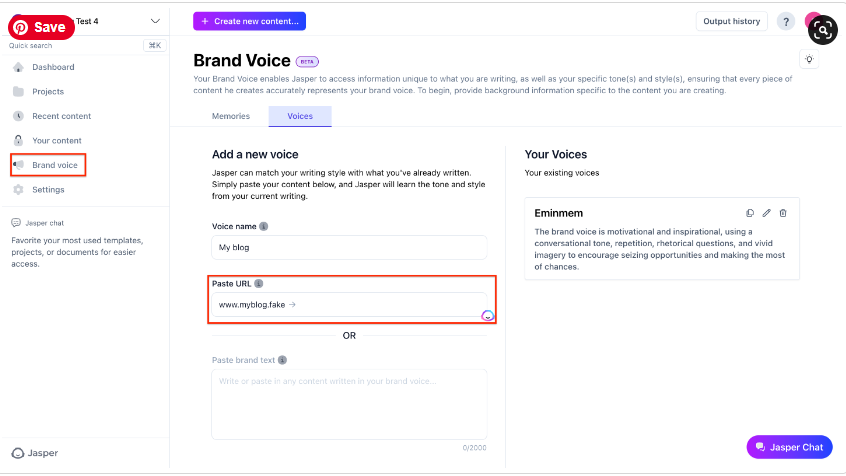
The “Boss Mode” is powerful, but the real value is in the structured templates and the “Brand Voice” feature.

 I was able to upload a company’s style guide and existing blog posts, and Jasper learned to write in that specific tone. 

However, the best results come from a human-AI partnership: Jasper produces the first 80%, and a human editor refines, fact-checks, and adds the final 20% of strategic insight and personality.

Case Study: Marketing Agency Achieves 3x Content Output

Challenge: A B2B marketing agency needed to produce weekly blog posts, social media updates, and ad copy for a new tech client but didn’t have the budget to hire more writers.

Solution: They subscribed to Jasper.ai. They used the “Blog Post” workflow to generate outlines and initial drafts, the “AIDA Framework” template for ad copy, and the “Content Improver” to repurpose blog content for Twitter and LinkedIn.

Result: The agency was able to increase its content output for the client by 300% while maintaining quality. The time saved allowed their senior strategist to focus on high-level planning instead of drafting. The client was thrilled with the increased online presence, and the agency secured a long-term retainer.

A screenshot of the Jasper.ai interface showing the Brand Voice feature

AI Video: The New Frontier of Marketing

Top AI Video Generators: Choosing Your Weapon

The key is to match the tool to the task.

Synthesia or HeyGen are unbeatable for corporate communication.Think training videos or sales outreach where a consistent, professional avatar is key.

For turning a blog post into an engaging social video, InVideo is a workhorse.

For purely creative and cinematic output, tools like RunwayML and Pika Labs are leading the charge, though they are still more experimental.

Case Study: A Real Estate Agent Creates Personalized Tours

Challenge: A real estate agent wanted to send personalized video walkthroughs to potential international buyers but didn’t have time to film a unique video for every inquiry.

Solution: Using Synthesia, she created a template with her own custom AI avatar. The script was 90% the same for each property, but she could easily change the intro to address the potential buyer by name and mention key features they were interested in (“Hi John, as you mentioned you wanted a large backyard, take a look at this…”).

Result: Her engagement rate with potential buyers skyrocketed. The personalized touch of the videos made clients feel valued and led to a 25% increase in qualified leads scheduling virtual meetings.

The AI Agency Blueprint: Proprietary Tech, Industry Standards & Strategy in Lebanon

The conversation around Artificial Intelligence is shifting. It is no longer just about which tools to use (ChatGPT vs. Gemini), but how to integrate them into automated, intelligent systems.

As a specialized AI agency in Lebanon, we believe in transparency. There are tools we have built from scratch because the market didn’t offer them, and there are standards we believe every modern agency must adopt to survive in 2026.

In this guide, strictly from our perspective at Fatcow Digital, I will walk you through our proprietary “Agentic” workflows, and answer the hard strategic questions about pricing and ownership that most agencies avoid.

Diagram showing the integration of various AI systems for agency workflows

Part 1: Proprietary Tech We Built (Our Competitive Edge)

Unlike traditional agencies that rely solely on public tools, we have developed custom software to solve specific bottlenecks for our clients in the Lebanese market.

1. The Automated SEO Content Engine

The Reality: Most agencies just prompt ChatGPT and copy-paste. We realized this wasn’t enough to rank for competitive keywords.

Our Innovation: We developed a custom WordPress Plugin that integrates directly with AI model APIs. This isn’t just about writing text; it is a system that:

  • Analyzes SERPs: It scans the top 10 ranking results on Google for your target keyword.
  • Structures the Data: It understands the headings, word count, and entities used by competitors.
  • Executes: It writes a complete, 100% SEO-compatible article (including H2/H3 tags and images) with a single click.

Diagram illustrating the workflow of the Automated SEO Content Engine

2. The Evolutionary Landing Page Generator

The Reality: Generic templates die hard. Custom design is expensive and slow.

Our Innovation: We used Google Vertex AI to train a “Fine-Tuned Model” specifically on our agency’s data. We fed it our top 50 highest-converting landing pages.

The result? A model that doesn’t guess. It generates landing page copy and layouts that adhere to our proven conversion science, ensuring higher ROI for our clients from day one.

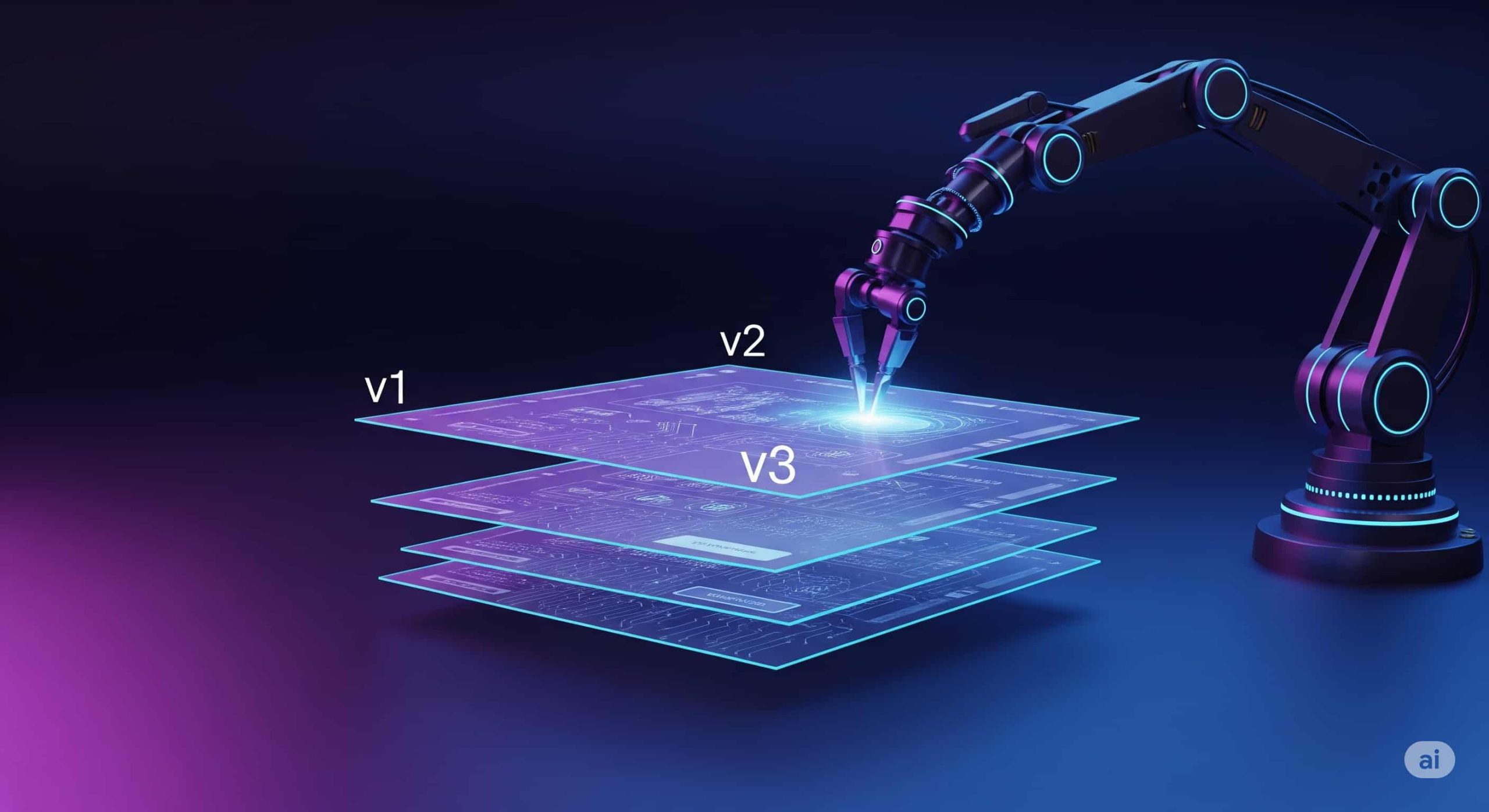
The process of the Evolutionary Landing Page Generator using fine-tuned AI models

Part 2: The Industry Standard (What Any AI Agency Should Do)

Beyond our private tools, there are workflows that represent the “Minimum Standard” for any AI agency in 2026. If your agency isn’t doing this, they are falling behind.

3. The Requirement: Automated Ad Analysis

The Old Way: A human analyst logs in once a week, looks at a dashboard, and sends a PDF report.

The AI Agency Standard: Agencies must now deploy “Observer Agents.” These are scripts that connect directly to the Google Ads API and run 24/7. They shouldn’t just report data; they must analyze it.

Any modern workflow should automatically flag underperforming ad groups and suggest new headlines based on real-time data, not weekly meetings. This is the level of automation businesses in Lebanon should demand.

Workflow of the AI-Powered Google Ads Analyst

4. The Future: Predictive Modeling

Reporting on the past is easy. The true value of an AI agency lies in prediction.

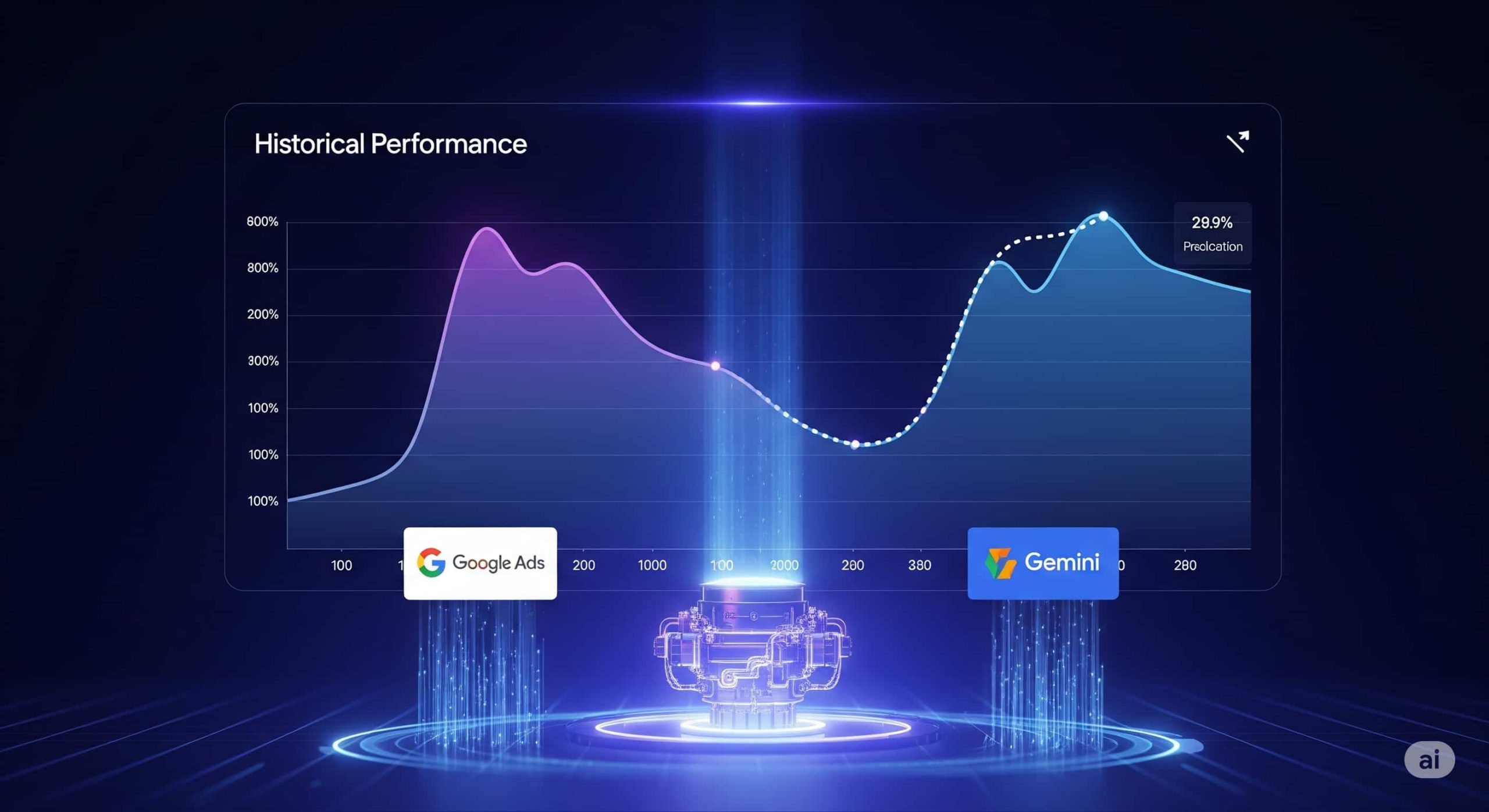
We believe the industry is moving towards Predictive Ads Engines. By combining creative data (from LLMs like Gemini) with performance data, agencies should be helping clients forecast the outcome of a campaign before a single dollar is spent.

Concept diagram for a future Predictive Ads Engine

Part 3: Strategic Decisions for 2026

Many CTOs and marketing directors in Beirut ask us: “Should we build this in-house or hire an agency?” Here is the framework we use to help them decide:

The “Build vs. Buy” Framework

  • Build In-House if: The AI workflow is your core product (e.g., you are a SaaS company) and you have a dedicated engineering team to maintain the API integrations.
  • Hire an AI Agency if: You need immediate implementation without technical debt. As an AI agency in Lebanon, we handle the complex “orchestration” layers (LangChain, API keys, error handling) so you focus on business strategy.

Who Owns the “Digital Brain”? (IP & Ownership)

When an agency builds an AI agent for you, who owns it? At Fatcow Digital, we operate on a clear “Client-First” IP model:

  • Base Framework: We retain the rights to our underlying code infrastructure (the “pipes”).
  • The “Brain”: You own the fine-tuned model weights, the prompt logic, and the specific data sets used to train your agent. If you leave, you take your “Digital Employee” with you.

New Pricing Models

We are moving away from “billable hours.” You shouldn’t pay for how long it takes us, but for the value the system creates. We typically use two models:

  • System Retainer: A flat fee to maintain, update, and improve the AI agents.
  • Performance Share: For ad optimization agents, we often work on a % of the ad spend saved or the revenue generated by the AI’s decisions.

Conclusion: Setting the Bar High

At Fatcow Digital, we don’t just use AI tools; we build them. Whether it is our proprietary SEO Engine or our Fine-Tuned Landing Page models, we are committed to pushing the boundaries of what an AI agency in Lebanon can achieve.

Ready to modernize your marketing with intelligent systems? Reach out to Fatcow Digital today.

Luma AI vs. Runway Gen-3: Which AI Video Creation Tool is Right for You?

With the demand for video-based content rising – from social videos that need to pop and users looking for the fastest way to learn – AI-powered video creation has become less ‘cool thing to use’ and more ‘I need it in my life.

In this article, we’ll be looking at Luma vs Runaway.

Luma AI’s Dream Machine and Runway Gen 3 have become popular ai video creation tools, so let’s look at what they’re good at and which one might be better for you to use to start getting AI-powered video creation into your life.

Luma AI: The Simpler AI Video Creation Tool

Simply put, Luma AI’s Dream Machine is extremely easy to use.

It’s a platform designed to be easy to use and accessible to a wide audience.

It takes a simple text prompt and transforms it into a video.

Additionally, you can also give it still images to animate with your prompt. You can even give it more than one to identify frames you want within the generated video.

Luma AI dream labs user interface

Key Features of Luma AI

  • User-friendly Interface: Luma AI has a simple UI, making it instant for anyone to start using AI video creation.
  • Text-to-Video Generation: Use a text prompt to bring your idea to life.
  • Image-to-Video Transformation: Convert static images into moving videos with smooth animations and realistic movements (getting the movement as you want it might take trial and error sometimes).
  • Looping Feature: Easy to create looped videos for social media content.
  • Free Plan with Limitations: Luma AI has a free plan with 30 video generations per month, allowing users to explore it before committing to a paid subscription.

Runway Gen-3: Professional-Grade AI Video Creation Tool

Runway ML‘s Gen-3 is a more advanced AI video creation platform that better serves video editors, creative teams, and professional filmmakers.

Basically, anyone with experience using video editing software.

It has more tools available for videos of much higher visual quality (we’re talking real high-fidelity videos) and a lot more editing capabilities for you to create a polished product right on the platform.

Don’t let someone outpace you – check out these 15 useful AI tools after you learn how to use Luma AI

Key Features of Runway Gen-3

  • Advanced AI for High-Quality Video: Runway Gen-3 utilizes cutting-edge AI models to produce videos with exceptional realism and detail.
  • Extensive Editing Tools: Fine-tune your videos with advanced editing features like motion tracking, background removal, and seamless integration with industry-standard software like Adobe Creative Suite.
  • Collaboration Features: Runway Gen-3 facilitates seamless collaboration for teams working on larger video projects.
  • Flexible Pricing Plans: Runway Gen-3 offers a range of pricing plans tailored to different needs and usage levels.

Side-by-Side Comparison of Popular AI Video Creation Tools

Here’s a quick look at these two ai video creation tools isde by side.

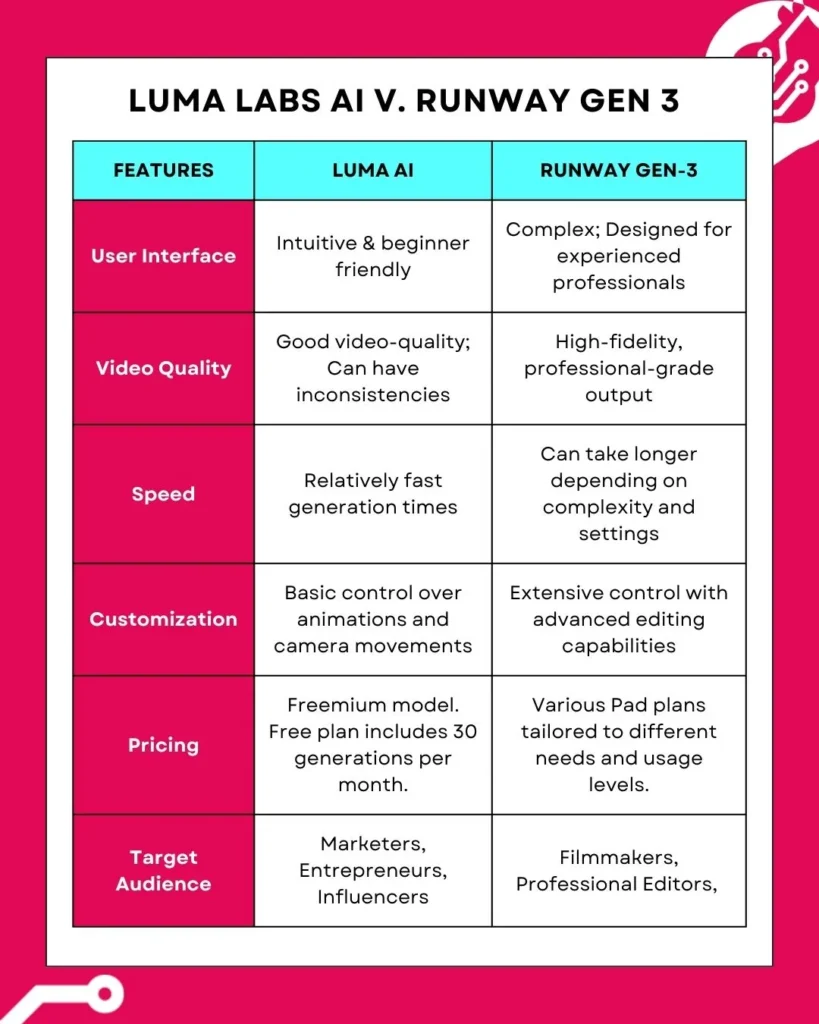
We’re comparing the following in this table: UI, quality of the video generated, the speed at which each tool generates videos, as well as how easy it is to customize the video you create with each.

Moreover, we included a quick comparison of pricing models and who each platform’s likely target audience is.

Side-by-side table of the two ai video creation tools Luma AI Dream Machine vs. Runway Gen-3

Weighing the Pros and Cons

Let’s take a quick look at the pros and cons of each platform.

Use this to see which one better fits your creation needs.

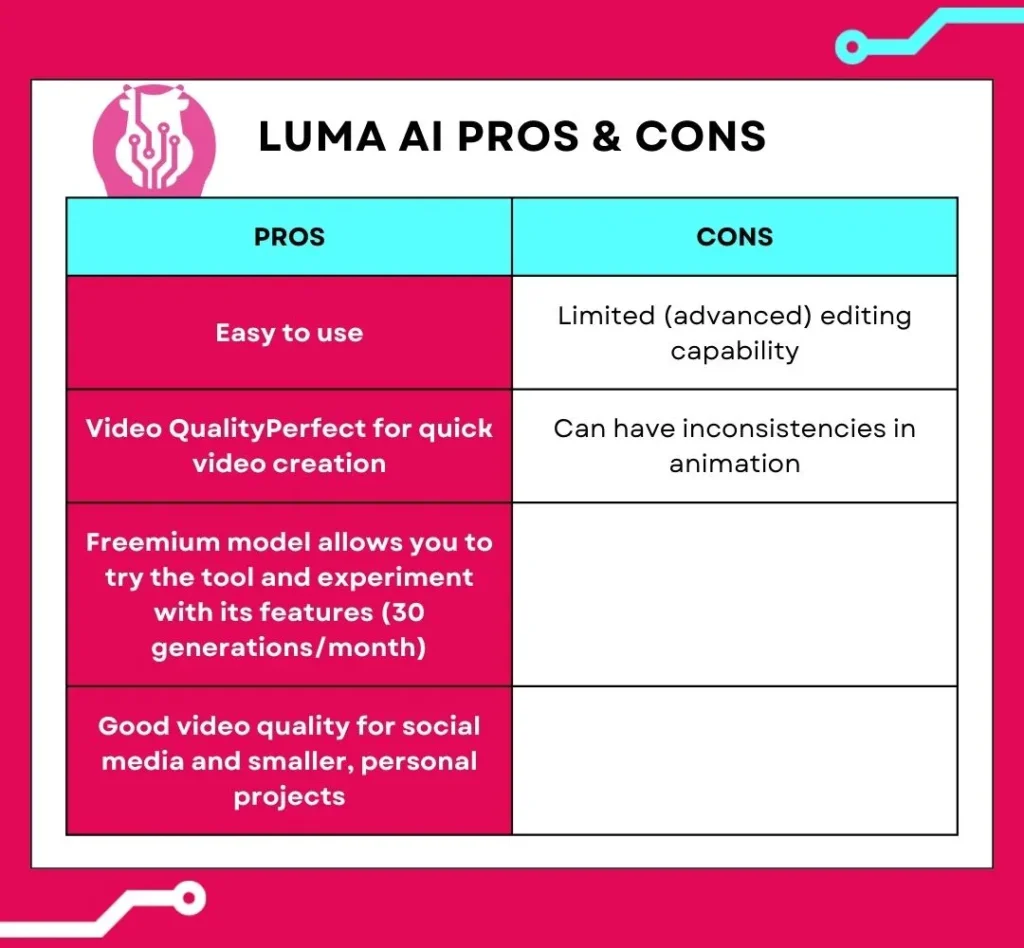
Pros and Cons of Luma AI

Pros and cons table of ai video creation tool Luma AI Dream Machine

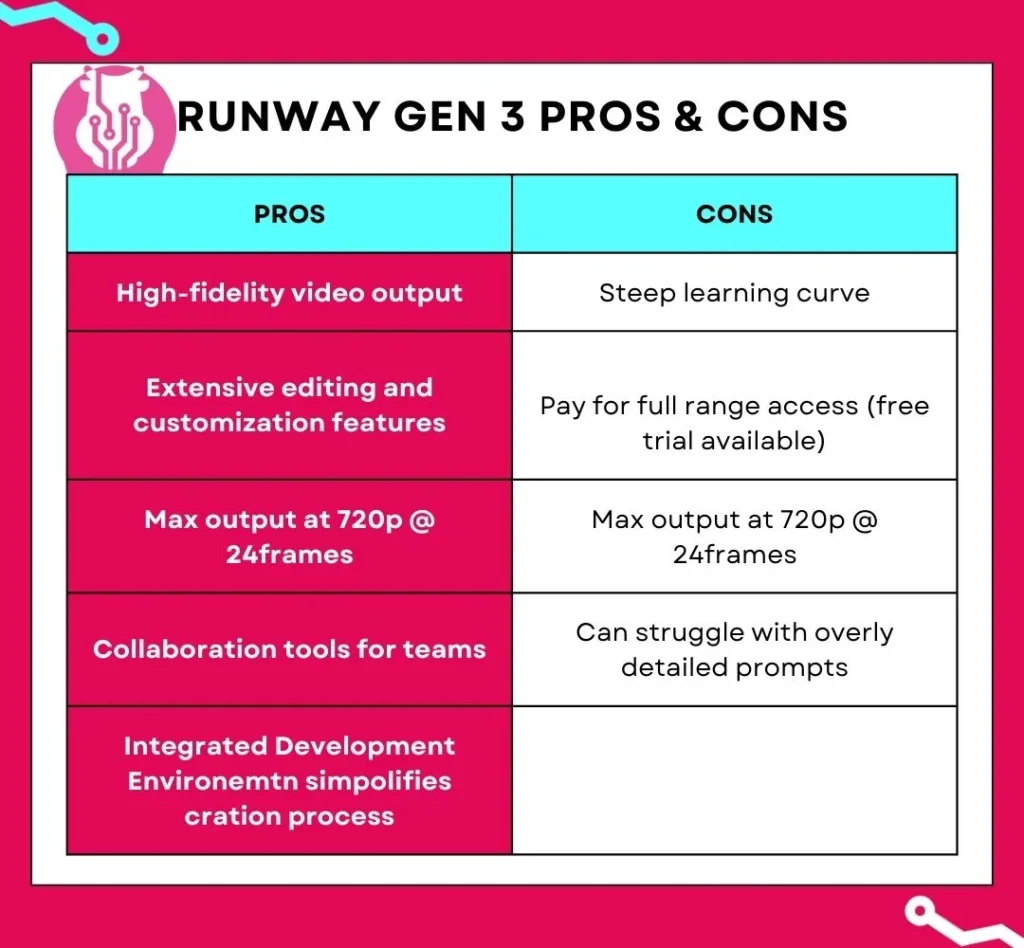
Pros and Cons of Runway Gen-3

Finding the Right Fit: Matching Tools to Use Cases

When to Use Luma AI:

  • Quick Social Media Videos: Luma AI’s Dream Machine is good when you’re creating quick, short-form videos for platforms like TikTok, Instagram, and Facebook.
  • Marketing Campaigns: Quickly generate eye-catching visuals for product demos, explainers, and promos.
  • Personal Projects: Bring your ideas to life without the need for editing skills.
  • Need An Extra Section: If you need an extra few seconds of video, using Luma can transform an image into something usable relatively quickly.

When to Use Runway Gen-3:

  • Professional Filmmaking: Leverage Runway Gen-3’s advanced capabilities for high-quality visual effects, scene generation, and post-production editing.
  • Complex Video Projects: Create sophisticated videos requiring intricate animations, motion tracking, and precise control over visual elements.
  • Team Collaboration: Streamline collaborative workflows for video production teams working on larger projects.

Use AI Video Creation Tools

So, you take your pick between Luma AI vs Runway.

Both are great tools for AI-powered video creation, but the choice depends on what you need.

For quick and simple video creation, Luma AI’s Dream Machine might be your better option.

For more professional-grade videos and way more editing control (and collaboration) Runway’s Gen-3 will be your better option.

If you’re still unsure what’s best, try both. They use a freemium model, so experiment and see what suits you best.

From Static to Stunning: How to Use Luma AI’s Image-to-Video Magic

It’s 2025, and video content is king. Thankfully, creating it is no longer as complex as it used to be. In just a few clicks, Luma AI’s video generator can breathe life into a still image. This how-to guide will show you the exact steps to take your visual storytelling to the next level.

Getting Started with Luma AI's Dream Machine

Luma AI is powered by the innovative Dream Machine. This allows creators of all levels to generate videos without any video editing knowledge. You get to generate 30 videos for free and can upgrade to a paid plan should you need more.

User interface of Luma AI Dream Machine

While you can create a video with its text-to-video capabilities, you’ll be able to better control the outcome by providing it with a high-quality image. Not a photographer? No problem! There are two primary ways to source an image:

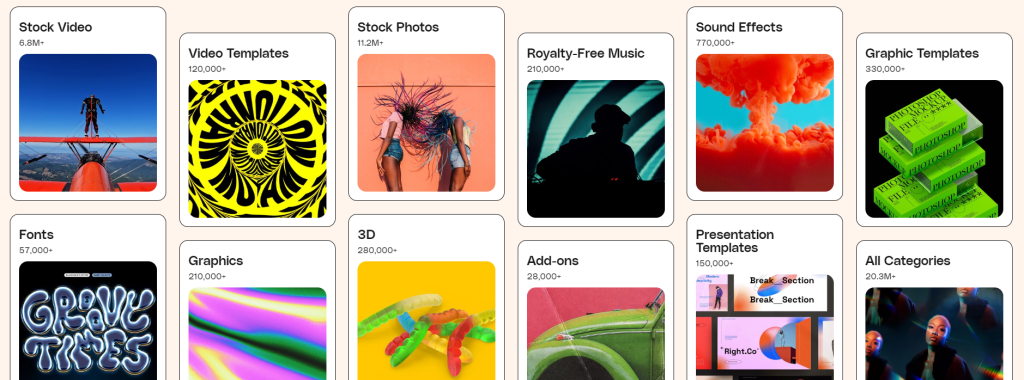
  1. Content Libraries: Stock photo websites like Envato, Freepik, and Shutterstock offer a vast collection of high-quality images.
  2. AI Image Generators: For a more customized approach, use AI image generators like Leonardo.ai or Midjourney to create unique images from detailed text descriptions.
Envato's image library interface

Animating Your Vision: A Step-by-Step Guide

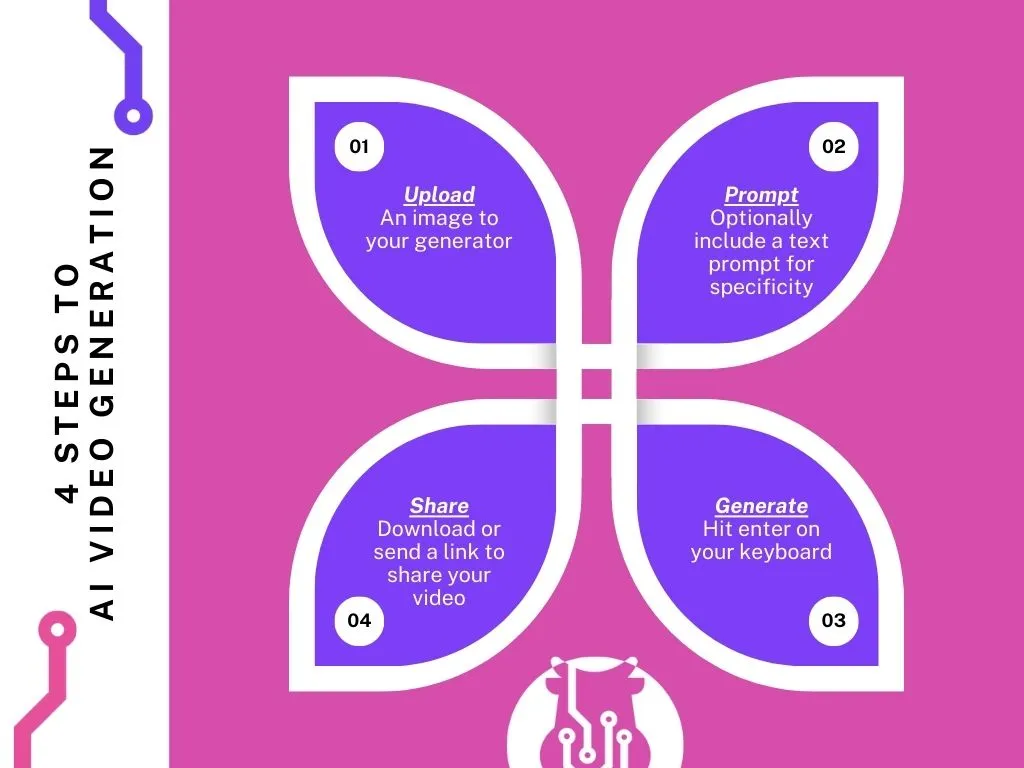
Once you have your chosen image, it’s time to bring it to life with Luma AI. The process is remarkably simple:

Step 1: Upload Your Image

Drag and drop your high-resolution image directly into the Luma AI interface. This will serve as the foundation for your video.

Step 2: Write Your Prompt

This is where the magic happens. Provide an optional text prompt to guide the animation. Describe how you want the image to come to life, including camera movements like panning, tilting, or zooming to add depth.

Step 3: Generate & Share

Once you’ve crafted the perfect prompt, hit “Enter” and let the Dream Machine work. The generation process usually takes a few minutes. When it's ready, you can download your video or share it directly.

Infographic showing the steps for AI video generation

Fun Fact: 89% of consumers want to see more videos from brands

0%

Are you meeting their expectations?

Tips on How to Use Luma AI Effectively

  • Resolution is Key: Always start with a high-resolution image to ensure the best possible video quality. The sharper your source image, the more detailed your final video will be.
  • Experiment with Prompts: Don’t be afraid to try different text prompts and camera movements. Each variation produces a unique result, allowing you to explore creative possibilities. Remember the free plan has a limit of 30 generations per month.
  • The Loop Advantage: Use Luma AI's Loop feature to create short, seamless videos perfect for social media. This enhances visual appeal and significantly reduces production time.
  • Addressing Glitches: As with any new tech, there might be minor irregularities. Luma AI is constantly evolving, and these are becoming less frequent. Don’t let a minor imperfection discourage you from exploring its vast creative potential.

Luma AI: Shaping the Future of Video Creation

Luma AI offers a fantastic solution for low-effort, high-quality video creation. Whether you’re a social media enthusiast, a seasoned video editor, or just a tech-geek who likes trying new tools, Luma AI can help you unlock creative potential you might not have known you had.

If you’re looking for more personalized help with your marketing efforts, book a complimentary 30-min session with us and let’s see how we can help.

15 Most Useful AI Websites That You Should Start Using Now

In an age where technology is advancing at warp speed, keeping up can seem challenging. But what if the most innovative online tools were not only powerful but also free? Today, we’re diving into a selection of useful AI websites that are revolutionizing how we create and communicate.

Mind-Blowing AI Chatbots

Person using a laptop with an AI interface

ChatGPT

Imagine an AI that can write poems, generate ideas, and hold a conversation. We all know ChatGPT does just that, making it a go-to for marketers seeking a creative spark.

Perplexity AI

Need quick summaries or linked search results? Perplexity AI is like having a research assistant who can quickly sift through information and give you the gist.

TextFX

Developed with Google, this tool helps turn your written words into engaging, reader-friendly content, perfect for blogs, social media, and websites.

Unreal AI Image Generators

AI robot working on a computer

Leonardo.Ai

Designed for a broad range of creative projects, Leonardo allows for the creation of high-quality visuals. Its standout feature is the real-time canvas that dynamically evolves images as you type.

Ideogram

A standout feature is its ability to generate images with accurate text, making logo creation and poster design a breeze. Its ‘Remix’ feature also lets you easily mimic any style.

Bringing Dimensions to Life: 3D Tools

Man frustrated with his computer

LeiaPix

Unleash your inner animator with LeiaPix. This tool adds a touch of magic to your 2D images, transforming them into 3D Lightfield visuals with depth and movement.

Luma AI

Step into the future with Luma AI’s easy-to-use technology for creating lifelike 3D models and scenes from video, making photorealistic 3D content accessible to everyone.

AI Tools for Music & Audio

Woman listening to music on headphones

Adobe Speech Enhancer

Say goodbye to background noise. This is a game-changer for content creators who can’t afford a studio. It cleans up your audio to make it sound crystal-clear and professional.

Suno AI

Unleash your inner songwriter. Simply type a description, and Suno AI crafts a complete song with vocals and instruments in your chosen style.

Conclusion

In a rapidly evolving tech landscape, staying ahead isn’t just about adapting—it’s about pioneering new ways to engage, create, and market. Leveraging these AI solutions positions you at the forefront of digital innovation.

For more insightful tips and updates on useful websites and online tools, and to discover how our services can revolutionize your digital marketing strategy, don't forget to follow Fatcowdigital on social media or reach out.