Navigating the AI Revolution: Your Comprehensive Guide to the Best Tools & Strategies

Artificial Intelligence is no longer a futuristic concept; it’s a practical, powerful tool reshaping industries.

This guide moves beyond surface-level comparisons to offer in-depth analysis, hands-on experiences, and practical case studies to help you master the AI landscape in chat,image, video, and content .
A dynamic collage of AI-generated art, chat interfaces, and video clips

The Ultimate Guide to AI Tools 2025: Art, Chat, Content & Video

AI image generation has democratized digital art. But true mastery lies in choosing the right tool and understanding the nuance of communication.

 It’s an art form in itself.

 Let’s look at the two dominant platforms from a practical standpoint.

Midjourney vs. Leonardo.Ai: A Hands-On Comparison

My Personal Experience:

After generating thousands of images on both platforms, the distinction is clear.

 Midjourney feels like collaborating with a master painter.

 Its default “aesthetic” is opinionated and stunningly beautiful. 

You guide it, but it brings its own powerful artistic vision.

 Leonardo.Ai, on the other hand, feels like an infinitely versatile workshop. 

It gives you direct control over every element, from training your own models on specific styles to using fine-grained tools like ControlNet for precise composition.

Midjourney vs. Leonardo.Ai

  • Midjourney operates with an “art director” philosophy, prioritizing aesthetic beauty and artistic coherence. It excels at quickly creating stunning, high-end visuals, even if it means deviating slightly from a literal prompt to achieve a more beautiful result.

  • Leonardo.Ai, on the other hand, functions as a powerful “toolkit” model. It gives the user extensive control and customization options. Its key features include a suite of advanced tools like ControlNet and Image Guidance, which allow for precise control over composition, character poses, and consistent styles.

  • The learning curve for Midjourney can be initially steep due to its Discord-based interface. Mastering its unique “language” of prompting takes practice and experimentation.

  • Leonardo.Ai offers a more accessible starting point with its clean web-based UI. However, its deeper features, such as custom model training and ControlNet, introduce a higher skill ceiling for users who want to take full advantage of its capabilities.

  • Midjourney is best suited for artists and designers who need to rapidly generate breathtaking, high-quality artistic images and value speed and beauty above all else.

  • Leonardo.Ai is the ideal choice for commercial artists, game designers, and anyone who requires consistent characters, specific styles, or precise compositional control in their work.

Case Study: A Freelance Designer Expands Her Services

Challenge: A freelance graphic designer wanted to offer custom illustrations for her clients (e.g., blog post headers, social media graphics) but lacked the time to create them from scratch.

Solution: She used Leonardo.Ai to train a custom model on her own artistic style, using 20 of her previous illustrations. 

Now, for new clients, she can generate dozens of on-brand concepts in minutes. 

Using the Image Guidance feature, she can ensure the composition perfectly fits the client’s layout requirements.

Result: She tripled her output for illustration-based projects and was able to take on more clients, significantly increasing her monthly revenue.The AI became her creative assistant, not her replacement.
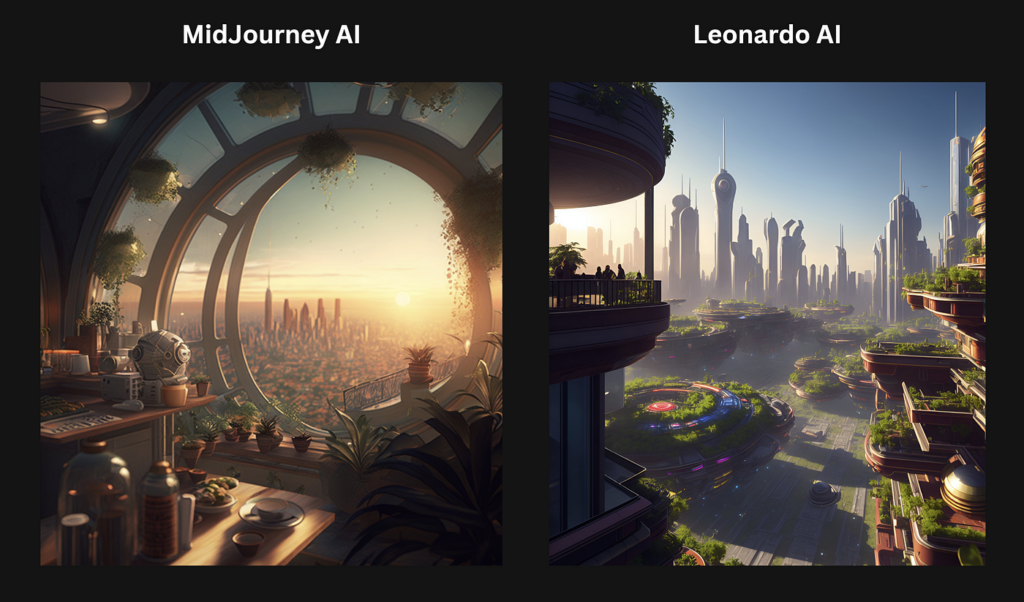
MidJourney VS Leonardo AI — Same Prompt, Different Results

AI Chatbots: Your New Reasoning Engine

We’ve moved beyond simple Q&A. Today’s top models are multi-modal reasoning engines. The choice between ChatGPT-4o and Gemini often comes down to ecosystem and interaction style.

ChatGPT-4o vs. Google Gemini: The Practical Difference

  • Core Strengths:

    • ChatGPT-4o excels at fluid, real-time, multi-modal interaction. It is designed to feel like a creative and conversational partner, with best-in-class performance for voice conversations and live visual analysis. It also offers a rich ecosystem of custom GPTs.

    • Google Gemini‘s primary strength is its deep integration with the Google ecosystem. It functions as a powerful “logistics engine” that can access and leverage live, real-time data from services like Gmail, Google Maps, Google Flights, and your personal calendar.

  • Practical Use Cases:

    • ChatGPT-4o is ideal for interactive tasks such as live brainstorming sessions, pair programming by sharing your screen, creative writing, and generating ideas on the fly. Its speed and conversational ability make it great for quick, dynamic interactions.

    • Google Gemini is highly effective for tasks that require accessing and managing personal data and web information. This includes planning complex trips (pulling flight info from emails and plotting routes on Maps), summarizing unread emails, managing your schedule, and getting up-to-date answers based on live web searches.

  • Multimodality:

    • Both models are natively multi-modal, meaning they can process and generate content across text, audio, images, and video.

    • ChatGPT-4o‘s multimodality is particularly optimized for rapid, human-like conversations and live analysis, such as looking at something through your camera and providing immediate feedback.

    • Google Gemini‘s multimodality is leveraged to enhance its core strengths, for example, by analyzing uploaded files or images and integrating that information with its Google app connections.

Case Study: An E-commerce Store Reduces Support Tickets by 40%

Challenge: A small online store was overwhelmed with repetitive customer service emails about order status, return policies, and product specifications.

Solution: They used Google’s Dialogflow (powered by Gemini) to build a chatbot for their website. They fed it their entire FAQ page, shipping policy documents, and product catalog. They integrated it with their Shopify store’s API.

Result: The chatbot now handles over 70% of initial customer inquiries. It provides instant order tracking, explains return procedures, and can even recommend products based on customer questions. Support tickets dropped by 40% within two months, freeing up the human team to handle complex issues and improve customer satisfaction.

AI Content: The Scalable Writing Assistant

In-Depth Review of Jasper.ai: Is It Worth It?

Using Jasper is like having a team of junior writers at your command. 

The “Boss Mode” is powerful, but the real value is in the structured templates and the “Brand Voice” feature.

 I was able to upload a company’s style guide and existing blog posts, and Jasper learned to write in that specific tone. 

However, the best results come from a human-AI partnership: Jasper produces the first 80%, and a human editor refines, fact-checks, and adds the final 20% of strategic insight and personality.

Case Study: Marketing Agency Achieves 3x Content Output

Challenge: A B2B marketing agency needed to produce weekly blog posts, social media updates, and ad copy for a new tech client but didn’t have the budget to hire more writers.

Solution: They subscribed to Jasper.ai. They used the “Blog Post” workflow to generate outlines and initial drafts, the “AIDA Framework” template for ad copy, and the “Content Improver” to repurpose blog content for Twitter and LinkedIn.

Result: The agency was able to increase its content output for the client by 300% while maintaining quality. The time saved allowed their senior strategist to focus on high-level planning instead of drafting. The client was thrilled with the increased online presence, and the agency secured a long-term retainer.
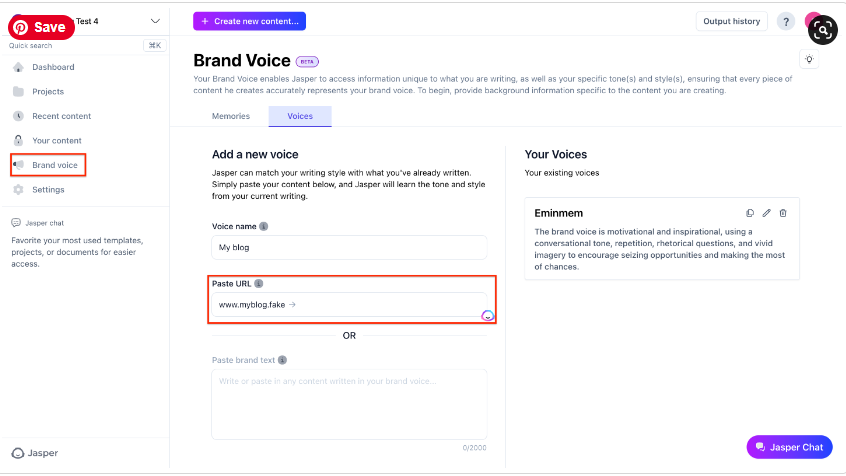
A screenshot of the Jasper.ai interface showing the Brand Voice feature

AI Video: The New Frontier of Marketing

Top AI Video Generators: Choosing Your Weapon

The key is to match the tool to the task.

Synthesia or HeyGen are unbeatable for corporate communication.Think training videos or sales outreach where a consistent, professional avatar is key.

For turning a blog post into an engaging social video, InVideo is a workhorse.

For purely creative and cinematic output, tools like RunwayML and Pika Labs are leading the charge, though they are still more experimental.

Case Study: A Real Estate Agent Creates Personalized Tours

Challenge: A real estate agent wanted to send personalized video walkthroughs to potential international buyers but didn’t have time to film a unique video for every inquiry.

Solution: Using Synthesia, she created a template with her own custom AI avatar. The script was 90% the same for each property, but she could easily change the intro to address the potential buyer by name and mention key features they were interested in (“Hi John, as you mentioned you wanted a large backyard, take a look at this…”).

Result: Her engagement rate with potential buyers skyrocketed. The personalized touch of the videos made clients feel valued and led to a 25% increase in qualified leads scheduling virtual meetings.


Luma AI vs. Runway Gen-3: Which AI Video Creation Tool is Right for You?

With the demand for video-based content rising – from social videos that need to pop and users looking for the fastest way to learn – AI-powered video creation has become less ‘cool thing to use’ and more ‘I need it in my life.

In this article, we’ll be looking at Luma vs Runaway.

Luma AI’s Dream Machine and Runway Gen 3 have become popular ai video creation tools, so let’s look at what they’re good at and which one might be better for you to use to start getting AI-powered video creation into your life.

Luma AI: The Simpler AI Video Creation Tool

Simply put, Luma AI’s Dream Machine is extremely easy to use.

It’s a platform designed to be easy to use and accessible to a wide audience.

It takes a simple text prompt and transforms it into a video.

Additionally, you can also give it still images to animate with your prompt. You can even give it more than one to identify frames you want within the generated video.

Luma AI dream labs user interface

Key Features of Luma AI

  • User-friendly Interface: Luma AI has a simple UI, making it instant for anyone to start using AI video creation.
  • Text-to-Video Generation: Use a text prompt to bring your idea to life.
  • Image-to-Video Transformation: Convert static images into moving videos with smooth animations and realistic movements (getting the movement as you want it might take trial and error sometimes).
  • Looping Feature: Easy to create looped videos for social media content.
  • Free Plan with Limitations: Luma AI has a free plan with 30 video generations per month, allowing users to explore it before committing to a paid subscription.

Runway Gen-3: Professional-Grade AI Video Creation Tool

Runway ML‘s Gen-3 is a more advanced AI video creation platform that better serves video editors, creative teams, and professional filmmakers.

Basically, anyone with experience using video editing software.

It has more tools available for videos of much higher visual quality (we’re talking real high-fidelity videos) and a lot more editing capabilities for you to create a polished product right on the platform.

Don’t let someone outpace you – check out these 15 useful AI tools after you learn how to use Luma AI

Key Features of Runway Gen-3

  • Advanced AI for High-Quality Video: Runway Gen-3 utilizes cutting-edge AI models to produce videos with exceptional realism and detail.
  • Extensive Editing Tools: Fine-tune your videos with advanced editing features like motion tracking, background removal, and seamless integration with industry-standard software like Adobe Creative Suite.
  • Collaboration Features: Runway Gen-3 facilitates seamless collaboration for teams working on larger video projects.
  • Flexible Pricing Plans: Runway Gen-3 offers a range of pricing plans tailored to different needs and usage levels.

Side-by-Side Comparison of Popular AI Video Creation Tools

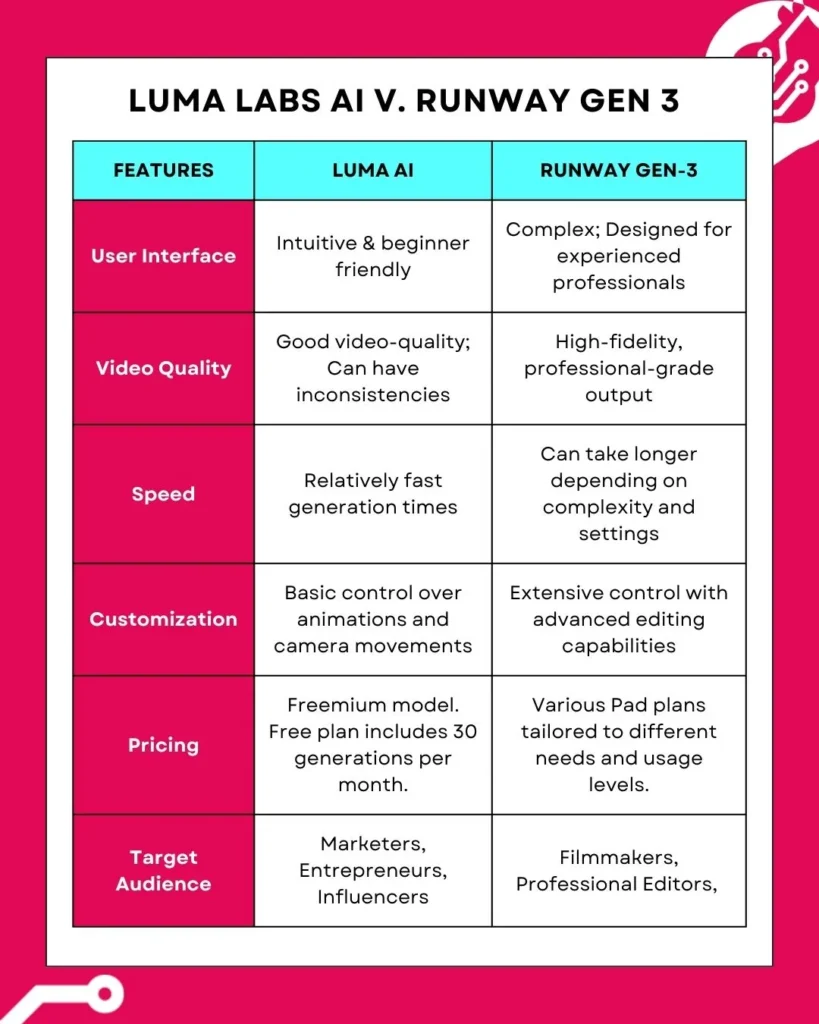
Here’s a quick look at these two ai video creation tools isde by side.

We’re comparing the following in this table: UI, quality of the video generated, the speed at which each tool generates videos, as well as how easy it is to customize the video you create with each.

Moreover, we included a quick comparison of pricing models and who each platform’s likely target audience is.

Side-by-side table of the two ai video creation tools Luma AI Dream Machine vs. Runway Gen-3

Weighing the Pros and Cons

Let’s take a quick look at the pros and cons of each platform.

Use this to see which one better fits your creation needs.

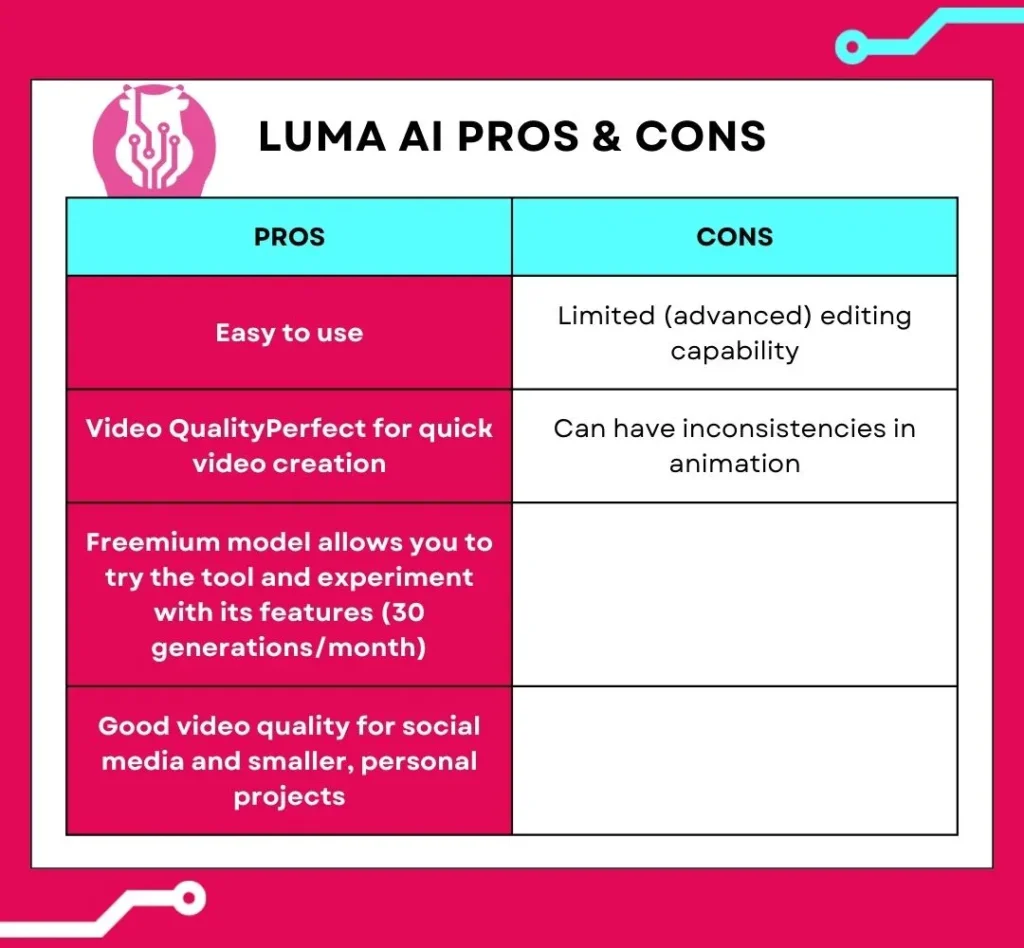
Pros and Cons of Luma AI

Pros and cons table of ai video creation tool Luma AI Dream Machine

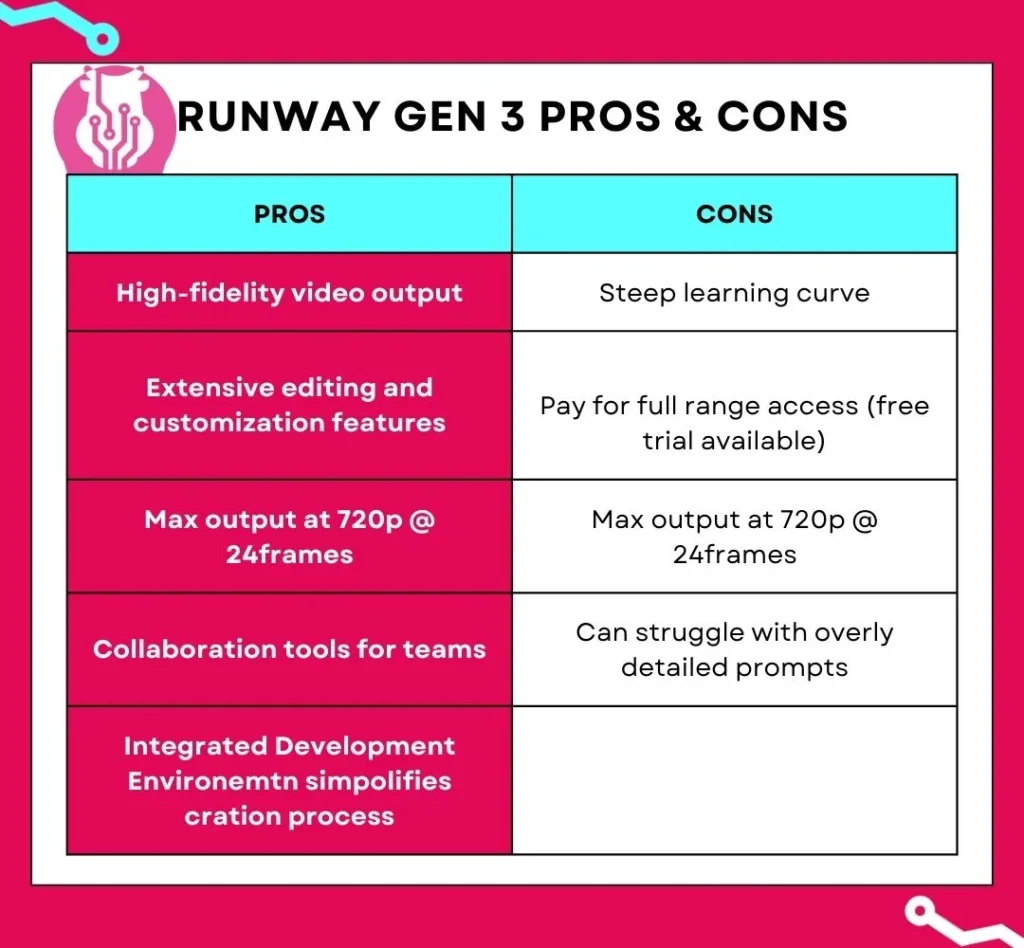
Pros and Cons of Runway Gen-3

Finding the Right Fit: Matching Tools to Use Cases

When to Use Luma AI:

  • Quick Social Media Videos: Luma AI’s Dream Machine is good when you’re creating quick, short-form videos for platforms like TikTok, Instagram, and Facebook.
  • Marketing Campaigns: Quickly generate eye-catching visuals for product demos, explainers, and promos.
  • Personal Projects: Bring your ideas to life without the need for editing skills.
  • Need An Extra Section: If you need an extra few seconds of video, using Luma can transform an image into something usable relatively quickly.

When to Use Runway Gen-3:

  • Professional Filmmaking: Leverage Runway Gen-3’s advanced capabilities for high-quality visual effects, scene generation, and post-production editing.
  • Complex Video Projects: Create sophisticated videos requiring intricate animations, motion tracking, and precise control over visual elements.
  • Team Collaboration: Streamline collaborative workflows for video production teams working on larger projects.

Use AI Video Creation Tools

So, you take your pick between Luma AI vs Runway.

Both are great tools for AI-powered video creation, but the choice depends on what you need.

For quick and simple video creation, Luma AI’s Dream Machine might be your better option.

For more professional-grade videos and way more editing control (and collaboration) Runway’s Gen-3 will be your better option.

If you’re still unsure what’s best, try both. They use a freemium model, so experiment and see what suits you best.

From Static to Stunning: How to Use Luma AI’s Image-to-Video Magic

It’s 2025, and video content is king. Thankfully, creating it is no longer as complex as it used to be. In just a few clicks, Luma AI’s video generator can breathe life into a still image. This how-to guide will show you the exact steps to take your visual storytelling to the next level.

Getting Started with Luma AI's Dream Machine

Luma AI is powered by the innovative Dream Machine. This allows creators of all levels to generate videos without any video editing knowledge. You get to generate 30 videos for free and can upgrade to a paid plan should you need more.

User interface of Luma AI Dream Machine

While you can create a video with its text-to-video capabilities, you’ll be able to better control the outcome by providing it with a high-quality image. Not a photographer? No problem! There are two primary ways to source an image:

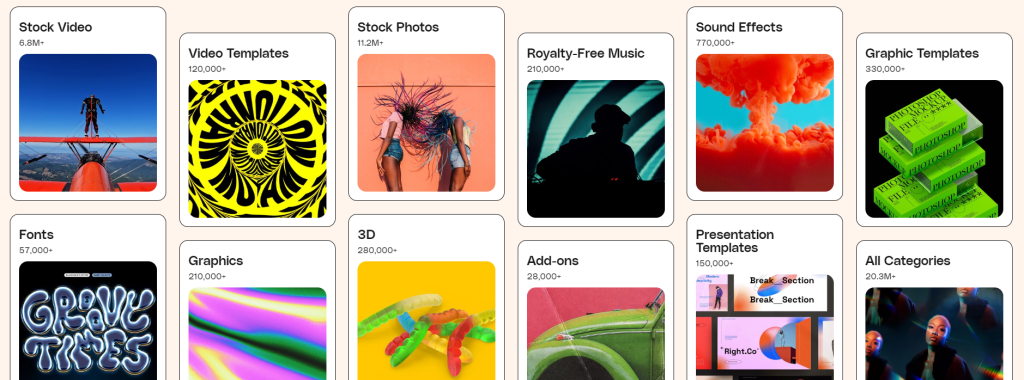
  1. Content Libraries: Stock photo websites like Envato, Freepik, and Shutterstock offer a vast collection of high-quality images.
  2. AI Image Generators: For a more customized approach, use AI image generators like Leonardo.ai or Midjourney to create unique images from detailed text descriptions.
Envato's image library interface

Animating Your Vision: A Step-by-Step Guide

Once you have your chosen image, it’s time to bring it to life with Luma AI. The process is remarkably simple:

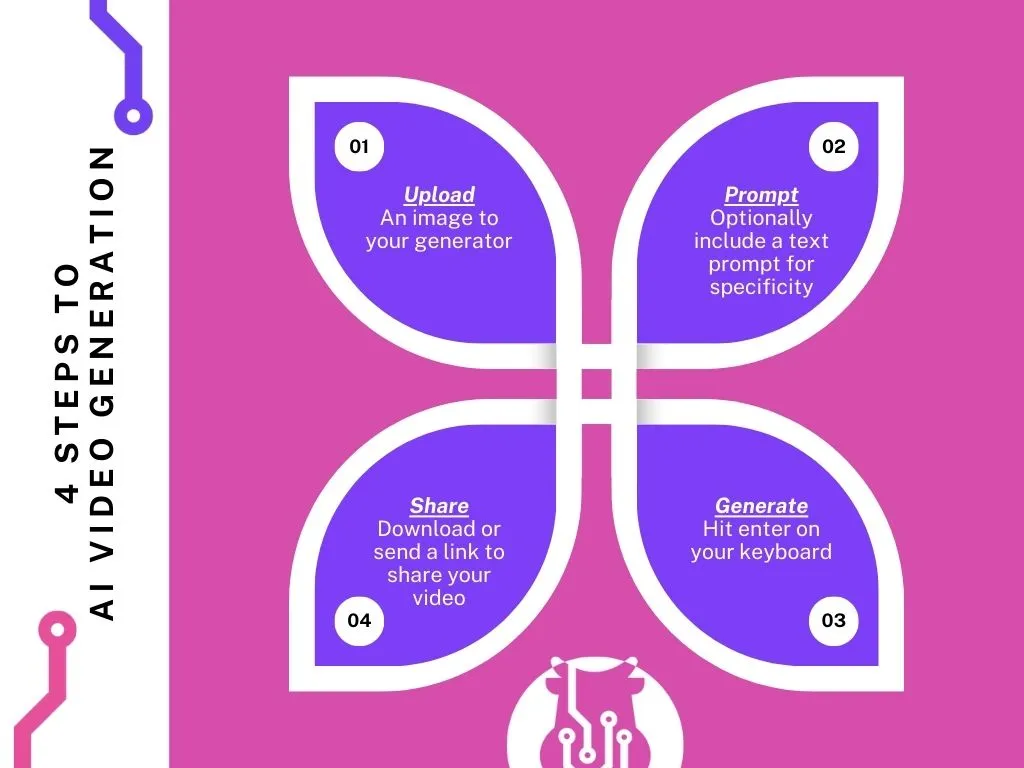
Step 1: Upload Your Image

Drag and drop your high-resolution image directly into the Luma AI interface. This will serve as the foundation for your video.

Step 2: Write Your Prompt

This is where the magic happens. Provide an optional text prompt to guide the animation. Describe how you want the image to come to life, including camera movements like panning, tilting, or zooming to add depth.

Step 3: Generate & Share

Once you’ve crafted the perfect prompt, hit “Enter” and let the Dream Machine work. The generation process usually takes a few minutes. When it's ready, you can download your video or share it directly.

Infographic showing the steps for AI video generation

Fun Fact: 89% of consumers want to see more videos from brands

0%

Are you meeting their expectations?

Tips on How to Use Luma AI Effectively

  • Resolution is Key: Always start with a high-resolution image to ensure the best possible video quality. The sharper your source image, the more detailed your final video will be.
  • Experiment with Prompts: Don’t be afraid to try different text prompts and camera movements. Each variation produces a unique result, allowing you to explore creative possibilities. Remember the free plan has a limit of 30 generations per month.
  • The Loop Advantage: Use Luma AI's Loop feature to create short, seamless videos perfect for social media. This enhances visual appeal and significantly reduces production time.
  • Addressing Glitches: As with any new tech, there might be minor irregularities. Luma AI is constantly evolving, and these are becoming less frequent. Don’t let a minor imperfection discourage you from exploring its vast creative potential.

Luma AI: Shaping the Future of Video Creation

Luma AI offers a fantastic solution for low-effort, high-quality video creation. Whether you’re a social media enthusiast, a seasoned video editor, or just a tech-geek who likes trying new tools, Luma AI can help you unlock creative potential you might not have known you had.

If you’re looking for more personalized help with your marketing efforts, book a complimentary 30-min session with us and let’s see how we can help.